
AI API management is the practice of controlling how your applications and agents call AI models and agent services: who may call them, which model or harness handles each request, what the call costs, and what was returned. For teams running more than one model or agent harness in production, the practical answer is a single unified interface that handles routing, usage tracking and runtime isolation in one place, instead of a separate integration per provider. HarnessRouter provides that interface for agent harnesses, models and sandboxes through one API.
TL;DR
- Traditional API management governs requests and routes; AI API management governs prompts, models, tokens and budgets.
- A gateway layer should handle authentication, routing with fallback, budgets and per-call logging so application code stays free of provider-specific logic.
- For agents, per-call logs are not enough: you need traces that show which step called which model, and a runtime that isolates each task.
- Start with one pilot route, one fallback and cost alerts before rolling out broadly.
- HarnessRouter exposes supported agent harnesses through one API, with a free plan at $0 per month and an open-source Community Edition.
What AI API management covers
Classic API management exists to publish, secure and meter your own APIs: authentication, rate limits per route, developer portals and versioning. AI API management applies the same discipline to a different traffic pattern. Your application is mostly a consumer of third-party model and agent APIs, and the unit that matters is no longer the request but the prompt, the model that answers it and the tokens it consumes.
Gartner describes AI gateways as the layer that manages, secures and protects API connections to AI providers, giving engineering leaders security controls, multi-LLM routing, cost visibility and data protection over AI usage. In practice, the work divides into five concerns:
| Concern | Question it answers | Typical control |
|---|---|---|
| Access | Who or what may call a model or agent? | Per-team or per-application keys, quotas |
| Routing | Which model, harness or provider handles this task? | Weights, capability matching, fallback chains |
| Cost | What did this call or task spend? | Token budgets, spend alerts per key and model |
| Safety and data | What may enter the prompt and leave the response? | Redaction, content filtering, audit logs |
| Runtime | Where does the agent execute and what can it touch? | Isolated sandboxes, session and file handling |
The last row is what separates managing a chat-completion call from managing an agent. An agent is made of a model, tools and instructions, and its tools are external functions or APIs it uses to take action, according to OpenAI's guide to building agents. Each tool call is another API interaction that needs authorization, limits and a record.
How an AI request travels through a managed layer
Picture one request from your product. The application sends it with a key issued by the management layer rather than a raw provider key. The layer checks limits and policy, resolves a route (primary model, fallback chain), translates the request into the provider's native format, retries or fails over on errors, normalizes the response, and records tokens, cost, latency and the model used.
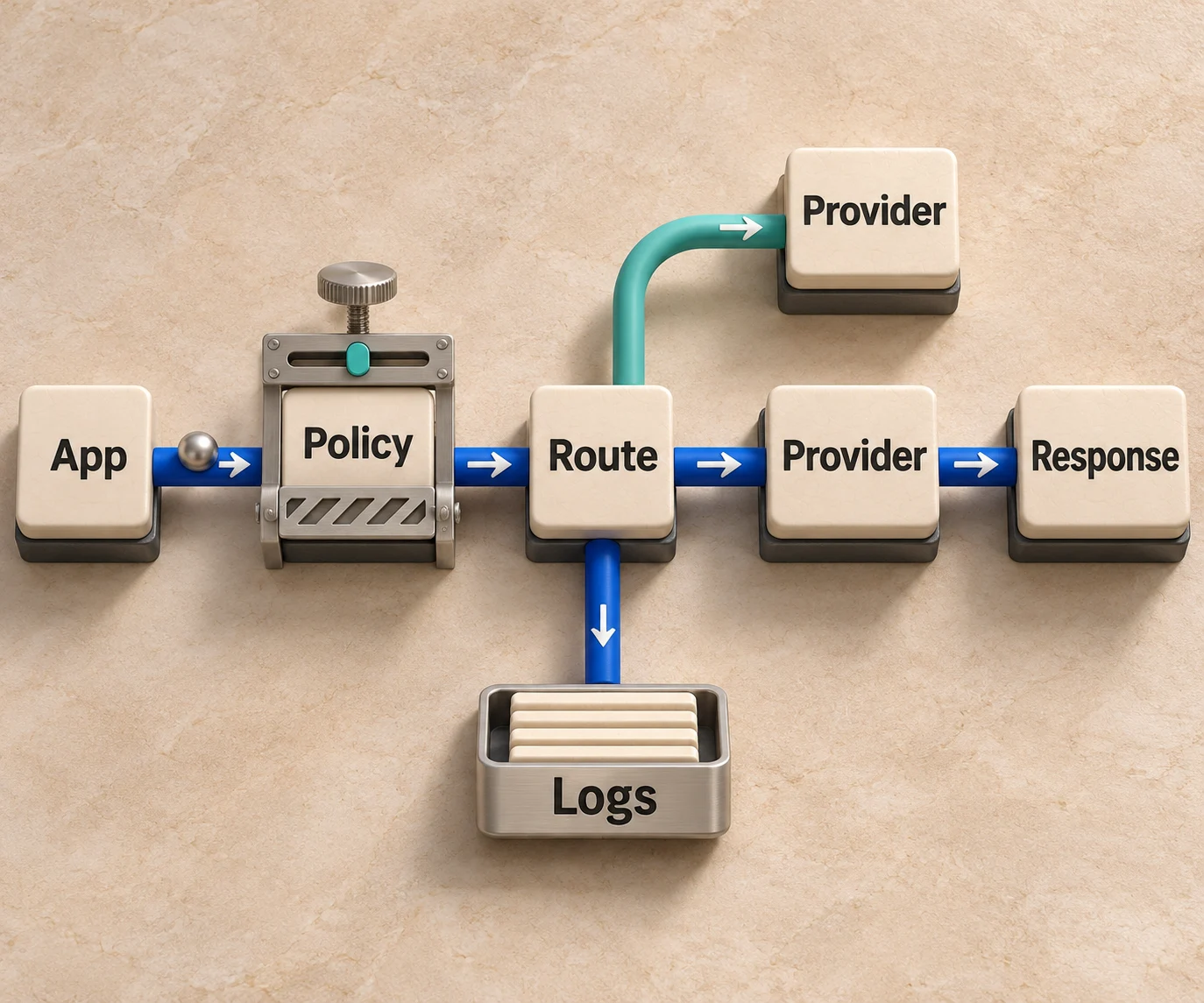
The benefit is that provider-specific work happens once. Changing a model, adding a provider or tightening a budget becomes a configuration change rather than a coordinated release across every service. Datadog makes the same point about gateway budgets: a spend limit or token cap becomes a config update to the proxy instead of a deployment across every agent service.
If you want the narrower building blocks first, our guides on what an LLM router does, where an LLM proxy stops and how a unified LLM API works cover each layer in detail.
Routing across models and providers
Routing is where AI API management pays for itself, because model prices and latencies differ widely and no single model is best for every task. Datadog's guidance on gateway reliability recommends retry logic with circuit breakers that stop routing to a failing provider, load balancing across deployments of the same model to stay under per-deployment rate limits, and tracking error rate, latency and fallback frequency per provider.
Three routing patterns cover most production needs:
- Weighted distribution. Send most traffic to a budget model and reserve a frontier model for a share of requests or for the tasks that need it.
- Capability matching. Route a request only to providers and models that support what it needs, such as tool use, long context or image generation.
- Failover. Move traffic to a secondary route automatically when the primary returns errors or slows down.
The weights and thresholds should come from your own workload, not from a blog post. Our guide to AI model benchmarking on your own workload shows how to build the test set that makes routing decisions defensible.
Routing agent harnesses, not only models
For agent products, the model is one choice among several. The harness (the runtime loop that wraps a model with tools, memory and instructions) determines how a task is executed, and different harnesses suit different tasks. HarnessRouter extends the routing idea to the whole agent: it turns harnesses, models, providers, skills, tools, plugins, memory and sandboxes into interchangeable modules, and lets teams use benchmarks to configure a compatible combination for quality, latency or cost, then runs it in an isolated sandbox. It supports harnesses including Codex, Claude Code, Hermes, DeepSeek and Pi, behind one API, and you can browse individual harness pages such as Continue and QwenPaw.
This is built on the open Unified Harness Protocol (UHP), which is why switching harnesses does not require rewriting your integration. For how UHP relates to tool-connection standards, see UHP vs MCP.
Cost control and token budgets
Many text-model APIs bill by tokens (the units of text a model reads and writes), while other AI services bill by images, seconds or requests, so request-based rate limiting alone does not fully protect a budget. Datadog recommends tracking spend per virtual key and per model over time, token usage by agent task, and the ratio of lightweight to frontier model calls, with alerts when a team nears its budget or spend turns anomalous. Gateway-level budgets can return a 429 response before a request ever reaches the provider.
A workable cost setup has four parts:
- Attribution. Every call carries a key or tag that maps to a team, product feature or customer.
- Budgets. Hard limits per key, with soft alerts at a lower threshold.
- Routing for cost. Send routine tasks to cheaper models and escalate only when needed.
- Trend review. Watch cost per completed task, not just total spend, because a cheaper model that needs retries can cost more per outcome.
HarnessRouter's own claim is that routing each task to the best-fitting harness and model cuts agent costs by over 90%; validate that figure on your own workload. Its pricing keeps the model-key layer simple: the BYOK routing fee is 0% for up to $25,000 in monthly model usage at list prices, with a 5% routing fee above that volume. Model charges go through your provider account; agent work and memory remain separately billable. Top-up credit carries a 5.5% processing fee, with a $0.80 minimum. Our LLM cost optimization guide for agent teams walks through the levers in order.
Observability: logs are the floor, traces are the goal
Because every request passes through the management layer, it can record model, tokens, latency and cost per call without extra instrumentation in your application. That is the cheapest place to begin. For agents, though, a list of individual calls hides the story: a single task may involve a planner, several tool calls and a retry, and the useful artifact is the full trace of which step called which model and where the run failed.
What to capture for each agent task:
- the harness, model and provider chosen, and why the route was selected;
- tokens in and out, cost and latency per step;
- tool calls with arguments and results;
- fallbacks triggered and errors returned;
- the identity of the key, user or agent that initiated the task.
That last item links observability to authorization. As agents take actions on behalf of users, proving which agent was permitted to do what becomes part of the audit trail, a theme covered in this piece on agent authorization and usage controls. Tracing is in beta and included with Scale; see the pricing page for current add-on terms, and our guide to AI agent observability lists what to trace, measure and audit.
Security and governance
Security for AI APIs extends beyond keys and TLS. The prompt itself is an input that can carry instructions, and responses can carry sensitive data. A governance policy at the management layer typically covers:
- Key hygiene. Issue scoped keys per application so a leaked key has a limited blast radius and can be revoked without touching provider credentials.
- Data minimization. Redact or mask secrets and personal data before they reach a third-party model.
- Least privilege for agents. Give each agent only the tools and files its task needs.
- Isolation. Execute agent tasks in a sandbox to isolate local code and files, and separately restrict network access, credentials and outbound tool permissions to protect production systems.
- Audit. Keep a record of what was sent, to which model, and what came back.
For a framework to structure the risk review, NIST's Generative AI Profile for its AI Risk Management Framework, released on July 26, 2024, helps organizations identify risks specific to generative AI and proposes actions to manage them. Treat it as a checklist for your governance design, and involve your security and legal teams for requirements that apply to your industry and region, such as data residency.
Perspective
Most teams begin AI API management as a model problem: one key, one provider, one SDK. It becomes an agent problem the moment the second harness, the second model family or the first sandboxed task enters production, because every new component brings its own interface, billing and failure mode.
Our view is that the harness layer should be an open, commoditized infrastructure layer, the way payments gateways and LLM routers made their layers interchangeable. That is why we initiated the Unified Harness Protocol: when a harness, a model, a memory store or a sandbox provider is a swappable building block, you choose each task's configuration for quality, latency or cost instead of inheriting a vendor's defaults.
A management layer that only proxies model calls leaves the larger part of agent cost and risk unmanaged. We built HarnessRouter to route the whole agent, run it in an isolation boundary and keep the interface open, so teams can scale agent-powered products without vendor lock-in or infrastructure complexity.
A rollout plan that avoids surprises
The most practical advice from implementation guides is to start small. One practitioner recommends a pilot route: one production-relevant use case, one primary route, one fallback, named owners, cost logging and a rollback path, with dashboards and alerts on usage, fallback rate, error rate and estimated cost before any broad rollout. The same source argues the pilot should prove the operating model rather than every advanced feature.
A sequence that fits that advice:
- Pick one workload. Choose a task with measurable quality, such as support triage or code review, and build a small evaluation set.
- Route it through the unified API. Replace direct provider calls with one endpoint and one set of scoped keys.
- Define the fallback. Name the secondary model or harness and the error conditions that trigger it.
- Set budgets and alerts. Alert before the limit, not at it.
- Review traces weekly. Look for expensive steps, retry loops and tasks that a cheaper route handled equally well.
- Expand by workload. Add routes one at a time, keeping rollback available.
For the production side, including environments, sessions and lifecycle, see deploying AI agents from prototype to production and the AI agent stack overview.
Build, self-host or use a cloud platform
An AI gateway can be assembled from open-source components, extended from an existing API management platform, or consumed as a managed service. The right choice depends on who operates it. A self-hosted gateway gives control over data paths and a managed platform removes operational work such as scaling, upgrades and sandbox provisioning. HarnessRouter supports both: the Community Edition is the open-source, self-hosted option, and HarnessRouter Cloud adds hosted agent runtimes. Our overview of open-source AI gateways explains what to evaluate either way.
How agent features reach your product matters too. If you are exposing agent capabilities to end users, the AI agent API guide shows how the pieces connect.
Managing agent harnesses through HarnessRouter
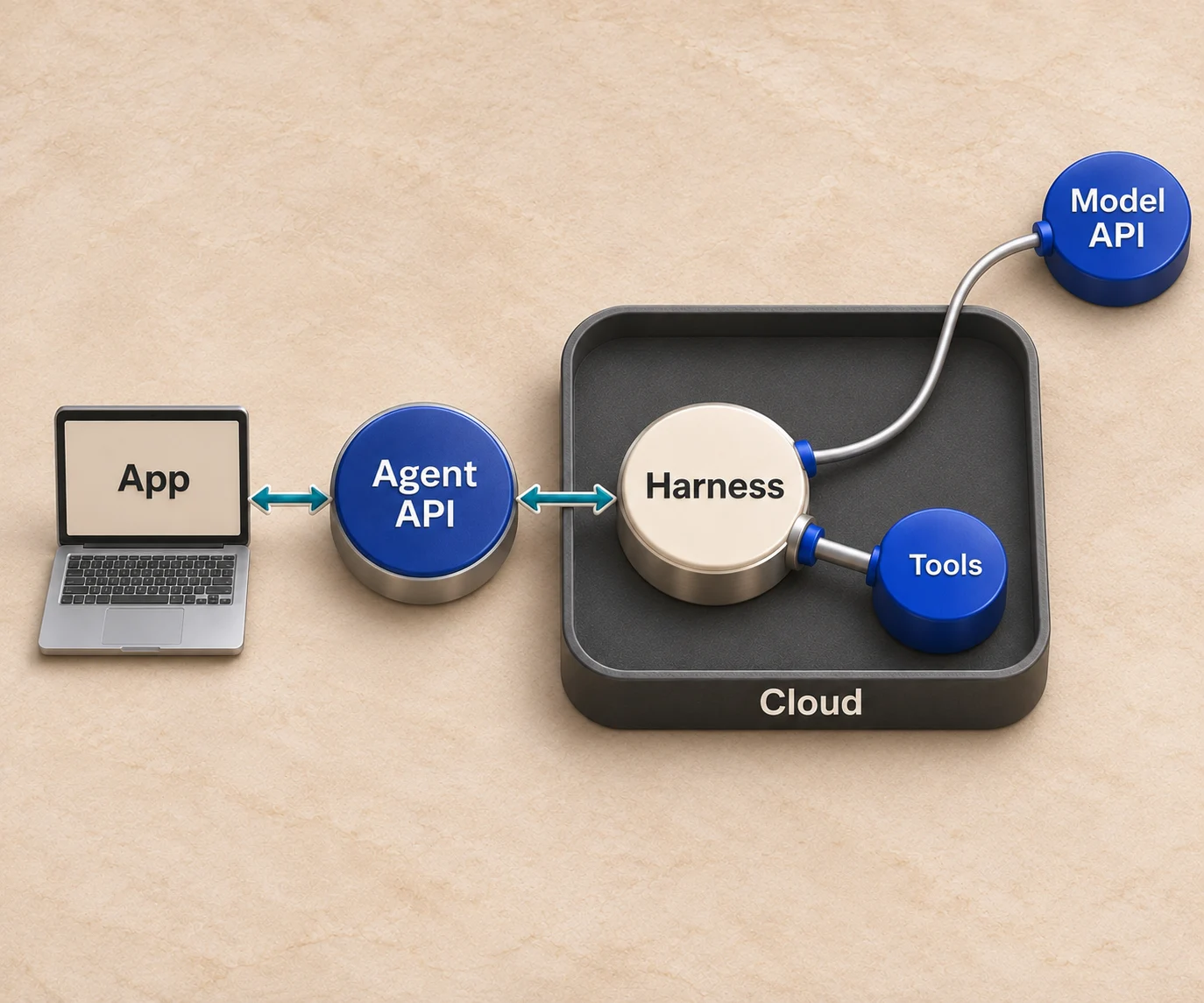
HarnessRouter is an open-source unified interface and cloud platform for integrating, benchmarking and managing multiple agent harnesses in production applications through one API. It includes agent session management, file handling, plugin support, environment provisioning, benchmarking tools and serverless agent runtime lifecycle features.
The cloud plans, as published on the pricing page, are:
| Plan | Price |
|---|---|
| Free | $0 per month |
| Developer | $20 per month |
| Production | $200 per month |
| Scale | $1,000 per month |
| Enterprise | Contact for pricing |
Usage-based fees apply to agent work, and agent short-term memory (Beta) has a list rate of $0.0000840 per GB-hour, with plan discounts; long-term memory is billed separately per operation. Start on the Free plan to route your first agent task through the API, or self-host the Community Edition if you need the stack inside your own infrastructure.

Details for every plan and fee are on the HarnessRouter pricing page, and the landing page introduces the platform.
FAQ
What is the difference between API management and an AI gateway?
API management decides whether a caller may reach a service and how much traffic it may send, with the request and route as the unit of control. An AI gateway decides which model receives a prompt, what data may enter it, what it costs and what came back, with the prompt, model and token budget as the unit. Many teams run both, and Gartner frames AI gateways as a distinct layer for AI provider connections.
Do AI agents use APIs?
Yes. An agent calls a model API for reasoning and uses tools, which are functions or APIs, to act. In the typical pattern, the model emits a structured JSON tool call and the application validates it, checks authorization, executes the function and returns the result. Each of those steps is traffic that API management should authorize and record.
What should I track first?
Start with tokens, cost and latency per model and per key, plus error rate and fallback frequency per provider. Then add cost per completed agent task, which shows whether routing choices are actually saving money. Alerts should fire before a budget is reached.
Can I use my own provider API keys?
Yes. HarnessRouter supports bring-your-own-key usage, and the BYOK routing fee is 0% for up to $25,000 in monthly model usage at list prices, with a 5% routing fee above that volume. Agent work and memory remain separately billable. Top-up credit, if you use it, carries a 5.5% processing fee with a $0.80 minimum, as shown on the pricing page.