
An open source AI gateway is a routing layer, with source code you can inspect and self-host, that sits between your application and one or more AI providers. Your code sends requests to the gateway instead of calling each provider directly. The gateway then handles provider selection, credentials, request translation, and policies such as caching, rate limits, retries, and failover, according to Arize AI's definition of an LLM gateway. When the product you are building runs agents rather than single model calls, the gateway question widens: you also need to decide what manages sessions, files, sandboxes, and agent runtimes.
This guide covers what a gateway does, what it does not do, the capabilities to require, the trade-off between self-hosting and a managed service, and a repeatable way to evaluate candidates before they reach production.
TL;DR
- An AI gateway is a control point for model traffic: routing, fallback, credentials, caching, rate limits, and logging in one place.
- It is not an agent framework and not a model provider. The framework decides what to ask, and the gateway decides which model receives the request and under what policy.
- Require OpenAI-compatible or provider-native endpoints, fallback behavior, per-key budgets, tracing, and an audit trail. Verify each one with your own traffic.
- Self-hosting gives control over data paths and deployment. A managed service removes on-call and upgrade work. Pick based on who will operate the gateway at 3 a.m.
- If your product runs coding agents rather than plain completions, a gateway alone leaves the agent runtime unsolved. That is the layer [HarnessRouter](/) targets.
What an open source AI gateway is
A gateway accepts a request in one format, decides where it should go, translates it into the format that destination expects, and returns the response in the format your client already understands. Because the gateway is on the request path, it is also the natural place to attach cross-cutting concerns that you would otherwise copy into every service.
The typical responsibilities are:
- Provider abstraction: one endpoint and one credential scheme in front of many model APIs.
- Routing: choosing a model by cost, latency, availability, or request attributes.
- Resilience: retries, timeouts, and failover to a secondary provider.
- Governance: rate limits, budgets, key scoping, and content filters.
- Telemetry: prompt and completion logging, token counts, latency, and cost attribution.
"Open source" adds practical properties. You can read the code that handles your credentials and prompts, run it inside your own network boundary, patch it on your schedule, and leave without rewriting your application, provided the gateway speaks a standard interface. For a broader view of the routing decision itself, see our explanation of what an LLM router is and our note on what an LLM proxy does and where it stops.
How a gateway differs from neighboring tools
Teams often compare gateways with tools that sit nearby in the stack. The boundaries are clearer when you ask what each tool is responsible for.
| Component | Primary job | Relationship to a gateway |
|---|---|---|
| Model provider | Hosts the models and serves inference | The gateway calls providers and does not replace them |
| General API gateway | Routes HTTP traffic, enforces authentication | Lacks model-specific concerns such as token counting and provider API translation |
| Agent framework | Orchestrates agent loops, tool calls, and memory | Makes model calls that the gateway routes |
| AI gateway | Routes and governs model calls | The subject of this guide |
| Agent harness runtime | Runs a complete coding or task agent with sessions, files, and sandboxes | Operates one level above model routing |
These distinctions follow the Arize AI glossary entry, which separates general API gateways from LLM gateways by the provider-specific work the latter performs, such as model identifier resolution, token counting, prompt and completion logging, and semantic caching.
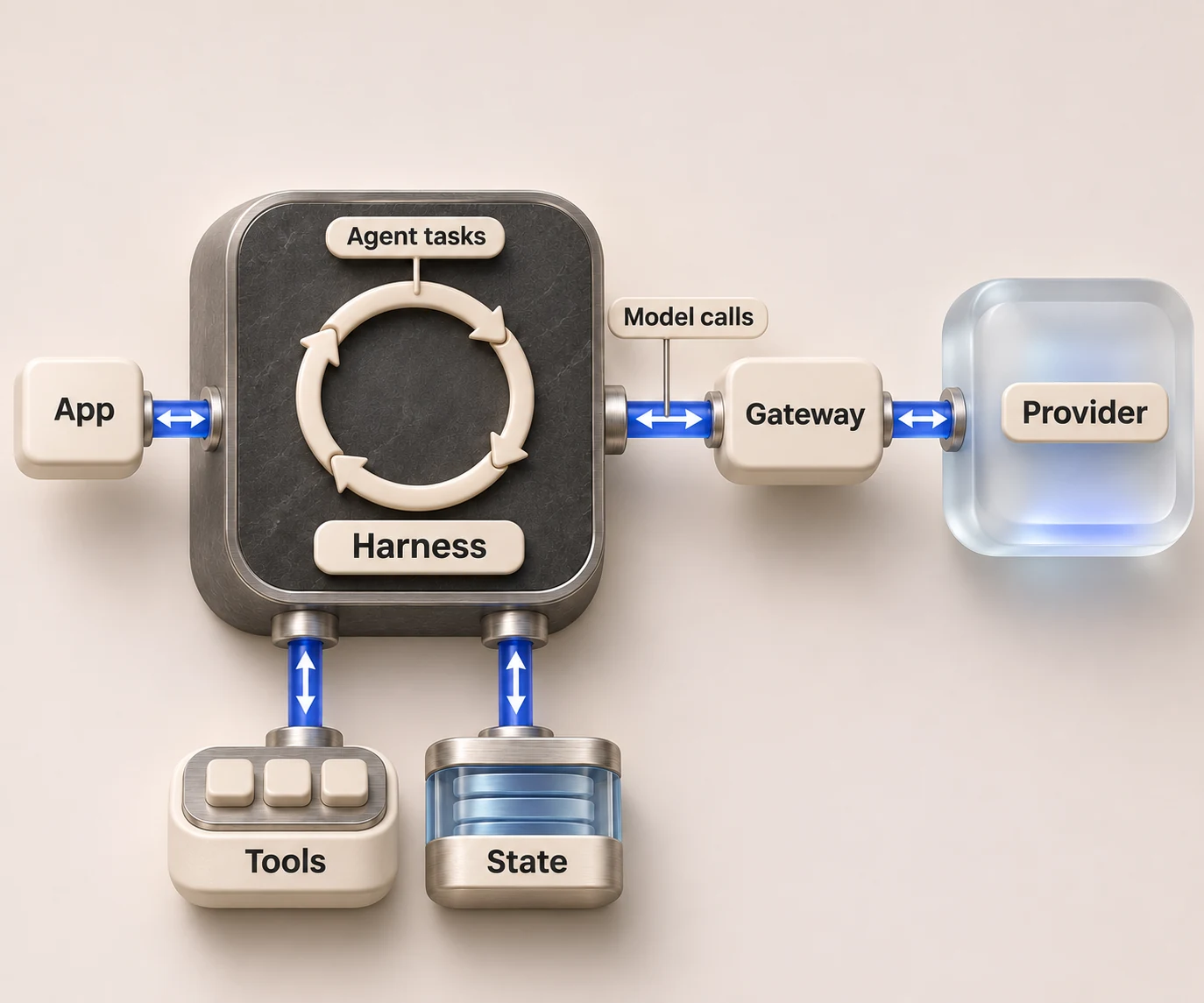
In a typical stack the application calls an orchestration or agent framework, the framework calls the gateway, and the gateway calls providers. The framework decides what to ask. The gateway decides which model to ask and how to enforce policy, cost, and observability. Our AI agent stack overview places each of these layers in context.
How requests flow through a gateway
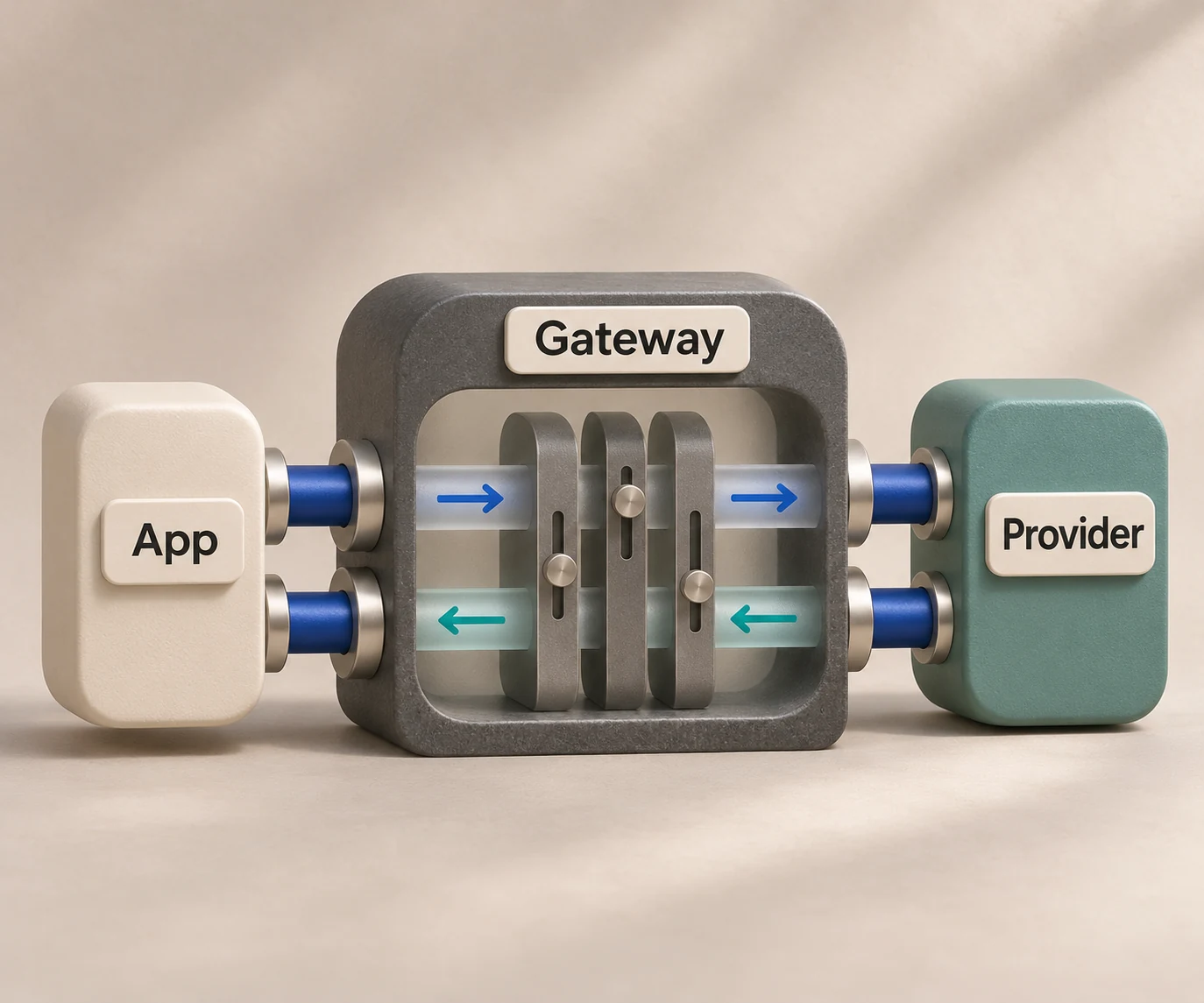
Picture one request. Your application sends a chat completion to the gateway with a virtual key. The gateway authenticates the key, checks its budget and rate limit, resolves the requested model name to a concrete provider and model, translates the payload if the provider uses a different schema, forwards it, streams the response back, and records the token usage and latency.
If the provider returns a retryable error, the gateway can retry or fall back to a second provider according to its configuration. Your application sees one stable endpoint throughout.
Two integration patterns
Arize AI describes two common ways to integrate. In the proxy pattern, you point an existing provider client at the gateway's base URL and send your gateway key, with no other SDK change. In the SDK wrapper pattern, a library speaks one API format and delegates either to the gateway or directly to providers. Both put the gateway on the critical path, a point covered in the Arize AI guide.
That placement shapes every later decision. A component on the critical path needs health checks, horizontal scaling, timeouts, and a tested failure mode.
Capabilities to require
A feature list is only useful if you convert it into acceptance criteria. For each capability below, define how you will observe it working.
Routing and fallback
Look for routing by model name, weight, cost, or latency, and for ordered fallback chains. Confirm what triggers a fallback: timeouts, 429 responses, 5xx responses, or content-policy rejections. Confirm that streaming requests fail over cleanly or fail visibly, because a stream that breaks halfway is a different problem from a request that fails at connect time.
Compatibility
The gateway should expose the API shapes your clients already use and support the providers you plan to run. Verify tool calling, structured outputs, streaming, image inputs, and reasoning parameters separately for each provider, because a gateway that translates basic chat may drop provider-specific fields. Also verify which agent frameworks your team uses and how they set base URLs and headers.
Observability
You need request-level traces with token counts, latency, model, provider, and cost, and you need them in a format your existing tools can read. OpenTelemetry's generative AI conventions define standard attributes for model parameters, response metadata, and token usage, so a gateway that emits them avoids a proprietary logging format. For a practical order of operations, this walkthrough on what to implement first in LLM observability is a useful companion when you plan usage monitoring and cost management.
Security and key management
Require virtual keys with scopes, per-key budgets, and rotation. Check where provider credentials are stored, whether prompts are logged by default, and whether you can disable or redact logging. If you operate in a regulated environment, confirm audit logging and the network boundary the gateway runs inside.
Cost controls
Budgets, rate limits, and cost attribution by key, team, or project are what turn a gateway from a convenience into a financial control. Check whether the gateway adds a markup to provider prices or charges for routing separately, since that changes the unit economics of every request.
Self-hosted or managed
Open source does not mean you must operate the software yourself. Most teams choose between three arrangements: self-host the open source edition, use a managed cloud built on the same code, or mix them by environment.
| Factor | Self-hosted | Managed |
|---|---|---|
| Data path | Gateway runs inside your network; requests to external model providers still leave it | Passes through the provider's infrastructure |
| Operations | You handle upgrades, scaling, and incidents | The provider handles them |
| Customization | Full access to code and configuration | Limited to exposed settings and plugins |
| Time to first request | Hours to days, depending on infrastructure | Minutes |
| Cost shape | Infrastructure plus engineering time | Subscription or usage-based fees |
The decision usually turns on one question: who is on call for a component that every model request depends on? A self-hosted gateway that nobody owns becomes an outage waiting to happen. A managed gateway that sits outside your compliance boundary may be unacceptable for sensitive prompts. A common path is to start managed for speed, then move to self-hosted when data residency or volume justifies the operating cost, which only works if the gateway is open source and speaks a standard interface.
A repeatable way to evaluate a gateway
Before a gateway reaches production, test it against your own workload rather than a vendor's benchmark.
- Write the acceptance criteria. List the providers, models, API features, and agent frameworks you need, and the failure behaviors you expect.
- Replay real traffic. Send a sample of production prompts, including long contexts, streaming, and tool calls, through the gateway and directly to the provider. Compare outputs and error rates.
- Measure added latency. Record the p50 and p99 overhead of the gateway at your expected concurrency, with and without logging enabled.
- Inject failures. Block a provider, return 429 and 5xx responses, and drop a stream mid-response. Record what your application sees.
- Audit data handling. Inspect what is logged, where it is stored, and how long it persists. Confirm key scoping and rotation.
- Price the full path. Add infrastructure, engineering time, gateway fees, and any routing or credit-processing charges to provider costs.
- Check the exit. Confirm you can switch back to direct provider calls or another gateway by changing a base URL and a key.
If you want a second pair of eyes on gateway options and deployment approaches, secure LLM integration services cover that kind of evaluation work.
Where gateways stop and agent products begin
A gateway routes model calls. It does not run an agent. If your product lets a coding agent read files, execute commands, keep a session, and produce artifacts, you also need an agent runtime: environment provisioning, session storage, file handling, plugin support, and lifecycle management. Teams that build this themselves end up maintaining a separate backend for every agent they support. Our posts on the backend for AI agents and on building your own agent stack versus connecting to complete agent harnesses describe that tradeoff in detail.
Portability matters at this layer for the same reason it matters at the model layer. If your product is wired to one agent's interface, changing agents means rewriting integration code. We cover that in what AI agent portability means, and the protocol landscape in AI agent protocols in 2026.
Our perspective
We build HarnessRouter on the view that the model call is no longer the unit of integration for agent products. A coding agent such as Codex or Claude Code brings its own loop, tools, file handling, and session state, and the product team that embeds it inherits all of that.
A gateway solves the routing half of the problem well. We think the other half, the agent runtime, deserves the same treatment: one interface, open source code, and the freedom to swap the underlying harness without rewriting the product. That is why HarnessRouter exposes a single Agent API across more than 30 agent harnesses and ships a Community Edition you can self-host, alongside a managed cloud.
We also believe that choosing a harness should be an empirical decision. Quality and price differ by harness and model, so we provide benchmarking tools that let teams compare them on their own tasks before committing. Our positioning is that model provider costs carry no markup from us, and that open standards such as the Unified Harness Protocol keep teams free of lock-in.
Using HarnessRouter alongside a gateway
HarnessRouter is an open-source unified interface that lets product teams plug Codex, Claude Code, Hermes, and other supported agent harnesses into their products through one Agent API. It includes agent session management, file handling, plugin support, environment provisioning, benchmarking, and serverless agent runtime lifecycle features, so you do not manage separate agent backends.

You can self-host the HarnessRouter Community Edition or use the managed cloud. Published cloud plans are Free at $0 per month, Developer at $20 per month, Production at $200 per month, and Scale at $1,000 per month, with Enterprise available on request. Additional fees include tracing at $50 per month, a 5.5% top-up credit processing fee. When you bring your own API keys, routing is fee-free up to $25,000 per month of model usage at listed prices, with a 5% routing fee above that volume. Current terms are on the pricing page. To compare harnesses on quality and cost, see the agent harness benchmark, or read about the Codex and Claude Code harnesses.
FAQ
Is an open source AI gateway the same as an LLM proxy?
The terms overlap. A proxy forwards requests, while a gateway usually adds governance such as budgets, key scoping, fallback, and observability. Many products that call themselves proxies now include gateway features, so judge by capabilities, not by the label. Our LLM proxy guide explains where a simple proxy stops.
Does a gateway replace an agent framework?
No. The framework orchestrates agent loops, tool calls, and memory, and the gateway routes the model calls the framework makes. You normally run both, with the gateway placed beneath the framework.
Will a gateway add latency?
It adds a network hop and processing, so it adds some overhead. The size depends on deployment location, logging settings, and concurrency, which is why you should measure p50 and p99 overhead with your own traffic before launch. Running the gateway close to your application usually keeps the overhead small.
Can I run a gateway and still use agents like Codex or Claude Code?
Yes. The gateway handles model routing and policy, while an agent runtime such as HarnessRouter manages the agent harness, its sessions, files, and environment. Teams can use the two layers independently, since each solves a different problem.