
Switching AI models should be a configuration change, not a refactor. The reliable way to get there is to put a routing layer between your application and the providers: your code calls one interface, and the layer decides which model, harness and provider serves each request. HarnessRouter is built for this: one API in front of supported agent harnesses, with models, providers and sandboxes as interchangeable parts, so a switch is a parameter change and a measured rollout instead of an integration project.
This guide covers how model routing works, the steps to move traffic from one model to another safely, how to handle keys, context, failures and cost, and what to measure afterward.
TL;DR
- Decouple your application from any single provider: call one unified interface and keep the model choice in configuration, not in application logic.
- Switch in stages: benchmark the candidate on your own workload, shadow or canary a small share of traffic, then promote it with a fallback in place.
- Treat keys, spend limits and data handling as part of the switch, because each provider has its own credentials, rate limits and retention terms.
- Trace every request with the model and task type attached, so cost, latency and quality per model are numbers rather than impressions.
- For agents, the model is only one swappable part: the harness, tools, memory and sandbox change the result too, and a good router treats them as parts as well.
Why switching models is hard without a routing layer
A direct integration ties more than an endpoint URL to your code. Each provider has its own request schema, authentication scheme, streaming format, tool-calling conventions, error codes and rate-limit behavior. When a new model lands that is cheaper or better at your task, the cost of trying it is the engineering time to adapt all of that, so teams delay, and the model choice made in the first sprint quietly becomes permanent.
A routing layer removes that coupling. Academic work frames LLM routing as a per-query decision: given a query and a pool of candidate models, the router selects the model that balances expected quality against inference cost. Once that decision lives outside your application, changing it no longer touches application code.
Datadog makes the same operational point about gateways: because a gateway exposes a unified API across providers, teams can iterate on model choice per task by editing routing rules in configuration, without modifying application logic or building a bespoke control plane.
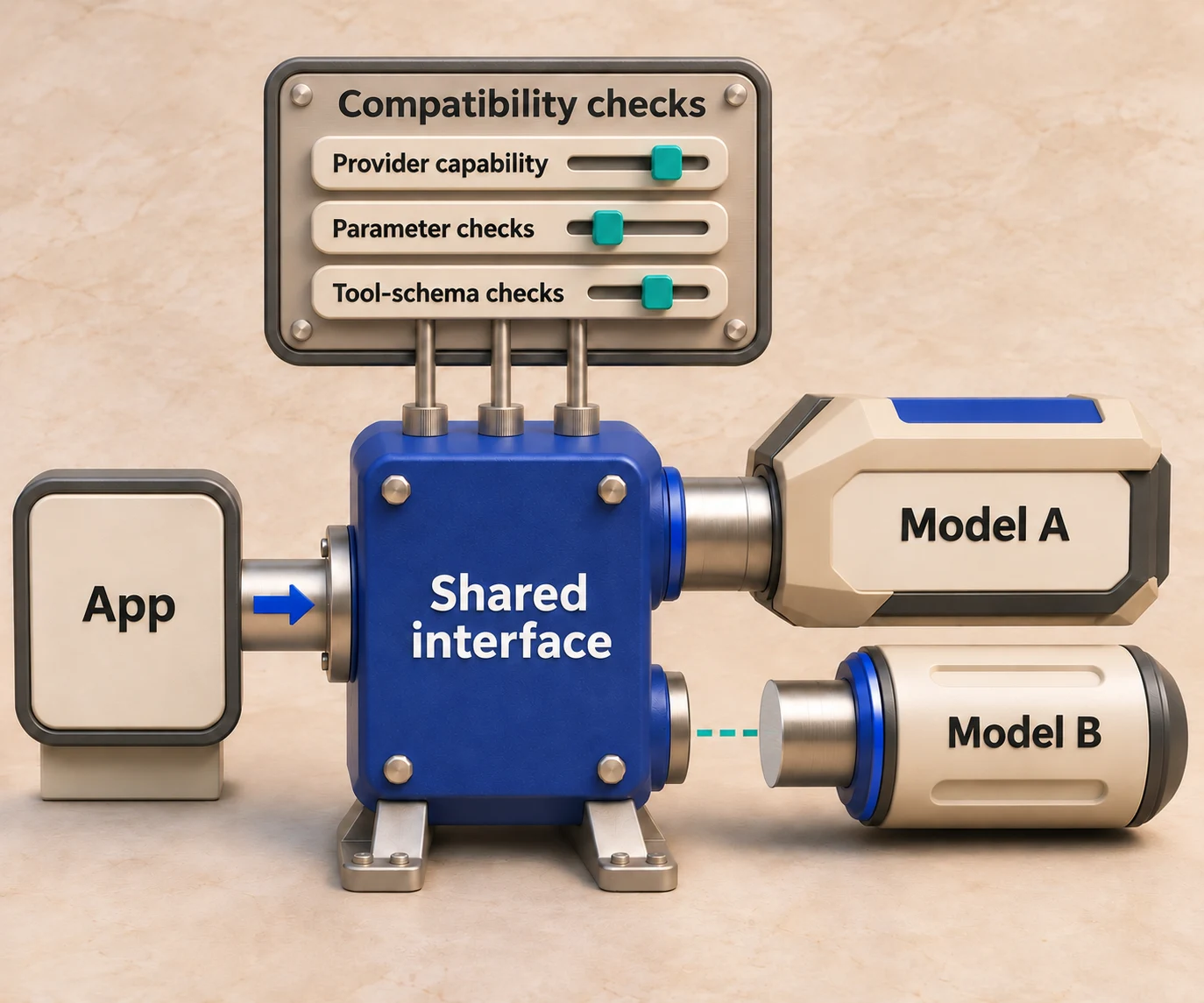
What a model routing API does
A model routing API is a single endpoint that accepts your request and forwards it to one of many models. Depending on the product, it does some or all of the following:
| Capability | What it means for you |
|---|---|
| Unified request format | One schema and one authentication method regardless of provider |
| Model selection | A static choice, a rule (by task, tag or tenant) or a learned decision per request |
| Fallbacks and retries | A second model takes over when the first is throttled or unavailable |
| Budgets and limits | Spend and rate caps per key, team or feature |
| Observability | Cost, latency and quality recorded per model and per task |
These layers go by different names: LLM proxy, unified LLM API, AI gateway, LLM router. The differences are mostly scope. A proxy forwards and normalizes; a router adds the decision; a gateway adds governance. If you want the longer taxonomy, our guides on what an LLM router is, where an LLM proxy stops and how a unified LLM API works go deeper on each.
For agent-powered products there is one more distinction. A chat completion call has one moving part, the model. An agent run has several: the harness that drives the loop, the model, the provider, skills, tools, plugins, memory and the sandbox where code executes. Swapping only the model leaves the rest of that stack hard-wired. HarnessRouter applies the routing idea to all of those parts, and runs the selected combination in an isolated sandbox.
How to switch AI models through one API, step by step
1. Move the model choice out of your code
The first change is structural. Every place that names a model string, builds a provider-specific payload or parses a provider-specific response should go through one client interface. The model identifier then becomes a value read from configuration, an environment variable or a routing rule.
Many unified APIs are shaped so that existing SDK code keeps working: you point the client at a different base URL, supply a different key and change the model field. With HarnessRouter, this means one API for the models and for the agent harnesses behind them, including Codex, Claude Code, Hermes, DeepSeek and Pi. The model catalog, with per-model prices, is on the model pricing catalog, and executable base integrations are documented on the models documentation page.
Where this goes wrong: leaving provider-specific logic scattered through the codebase, such as hard-coded tool schemas or token-limit assumptions. Search for them before you start, because they are the places where a switch will silently break.
2. Define what better means for your workload
Public leaderboards measure public tasks. Your traffic has its own prompts, its own tool calls and its own definition of a correct answer. Write down the criteria before you compare:
- Quality: a pass rate on a fixed set of real prompts, graded by assertions, a reference answer or a judge model.
- Latency: time to first token and time to complete the task, at the percentile your users feel (p95, not the average).
- Cost: price per completed task, not per million tokens. A cheaper model that needs too many retries may no longer be cheaper.
- Reliability: error and timeout rate, and behavior under rate limits.
Our method for this is laid out in AI model selection: matching models to tasks and AI model benchmarking on your own workload. HarnessRouter includes benchmarking tools, so the same interface that serves production traffic can run the comparison.
3. Benchmark the candidate before it sees users
Build an evaluation set of 50 to 200 representative requests, including the hard ones: long contexts, malformed inputs, multi-step tool use. Run the incumbent and the candidate through the same interface with identical prompts and comparable supported settings, recording any differences. Record quality, latency and cost for each.
Two cautions. First, keep sampling parameters comparable, because temperature and token limits shift results more than people expect. Second, re-run the set whenever a provider updates a model under the same name, since behavior can change without your code changing.
4. Roll out in stages
Promote the candidate in three moves:
- Shadow: send a copy of live requests to the candidate, enforce disabled or mocked side-effecting tools outside the prompt, discard its output and compare it with the incumbent's.
- Canary: serve a small share of real traffic, such as 5%, from the candidate, ideally segmented by task type or tenant rather than at random.
- Promote: raise the share while watching the metrics from step 2, and keep the previous model as a fallback target for a defined period.
Because the routing decision lives in configuration, rolling back is the same edit in reverse. That is the main operational benefit of the architecture: a bad model change takes minutes to undo, not a deploy cycle.
5. Add fallbacks, retries and limits
Switching is also what you do at 2 a.m. when a provider is throttling you. Datadog recommends gateway-level retry logic so a throttled or unavailable primary model retries a sensible number of times before rolling over to the next-best option, plus circuit breakers that stop routing to a failing provider and load balancing across multiple deployments of the same model to stay under per-deployment rate limits.
The same guidance carries a warning that matters for how you pick fallbacks: a fallback model can differ in cost, latency and quality, so A/B it and confirm it meets a minimum quality bar before it becomes a live failover. A fallback you have never evaluated is a quality regression waiting for an outage to trigger it.
A practical fallback chain has three properties: the second model uses an independent provider or deployment where outage independence matters, its context window fits the full request plus reserved output, and its tool-calling behavior has been tested against your tools.
6. Measure after the switch, and keep measuring
A switch is not done when traffic moves. Tag each request with the task type, model, harness and route taken, and track cost, latency, error rate and an evaluation score per model per task. Datadog argues that this kind of tracing is what turns model selection from a gut-feel decision into a measurable engineering process, because you can see each model's behavior on each task.
For customer-facing agents, the monitoring needs to look at behavior as well as infrastructure; these LLM monitoring best practices cover how to keep reliability and conversation quality visible once models start changing. Our own checklist for agent runs is in AI agent observability: what to trace, measure and audit. Tracing is in beta and included with Scale; see the pricing page for current add-on terms.
Keys, context and provider-specific settings
API keys and billing
Every provider issues its own credentials, and every credential is a leak risk and a budget risk. A routing layer reduces the surface: your application holds one key for the router, and provider credentials stay on the platform side. Two models are common. In the first, you buy credits and the platform pays providers. In the second, you bring your own provider keys and the router only forwards.
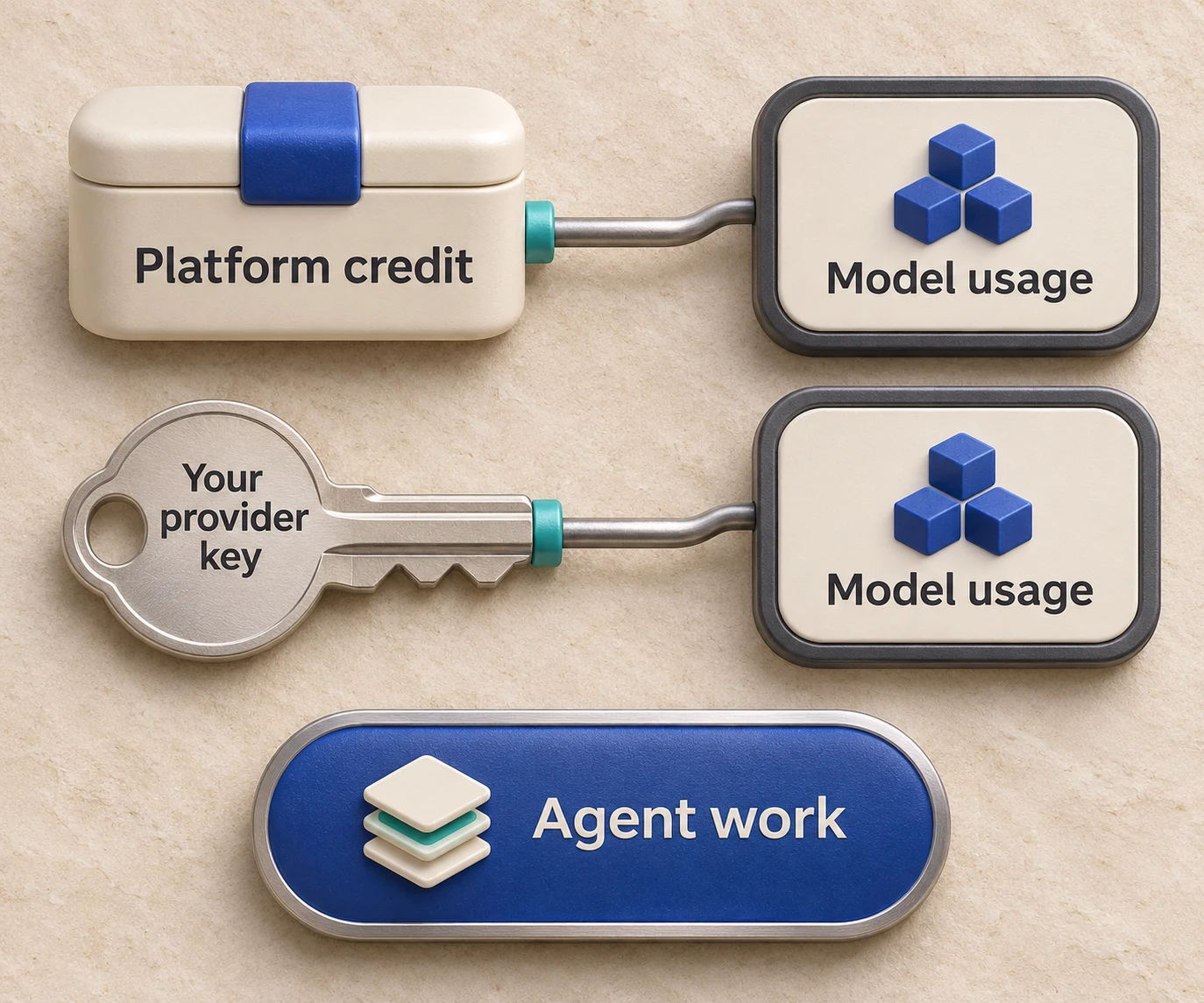
HarnessRouter supports both. Bring-your-own-key routing carries a routing fee of 0% for up to $25,000 in monthly model usage at list prices, with a 5% routing fee above that volume; agent work and memory remain separately billable. Top-up credit has a 5.5% processing fee with a $0.80 minimum, as listed on the pricing page. Whichever you choose, set per-key budgets and rate limits so a runaway loop in one feature cannot consume the budget of another. The same pattern appears in reference implementations of open gateways, which use virtual keys with budgets and rate limits and per-key spend tracking, as in Oracle's walkthrough of routing across OCI models.
Conversation context
The subtle failure in a mid-conversation switch is context. Different models have different context windows, tokenizers and expectations for system prompts and tool-call history. Three habits avoid most problems:
- Store the canonical conversation in your own session state, not inside a provider-specific object, so any model can be handed the history.
- Count the complete input, including instructions, tool definitions and history, with the target model's tokenizer and reserve output space before you route, and summarize or truncate on purpose rather than by error.
- Keep tool definitions in a neutral schema and translate at the edge.
For agents this is session management as much as prompt management. HarnessRouter handles agent session management and file handling at the platform level, and its agent short-term memory (Beta) has a list rate of $0.0000840 per GB-hour with plan discounts; long-term memory is billed separately per operation. As a result, state is held by the platform rather than tied to one model vendor.
Provider-specific settings
Parameters do not map one to one. A reasoning-effort setting, a maximum output limit or a structured-output mode may exist at one provider and not another. Keep a per-model profile in configuration that lists the supported parameters and their defaults, and let the router apply the profile for whichever model is selected.
Routing per request: static rules versus learned selection
Routing strategy comes in three levels of sophistication, and most teams should climb them in order.
| Strategy | How it decides | Best for |
|---|---|---|
| Static | One model per feature or environment | Early products, predictable workloads |
| Rule-based | Task type, tag, tenant, input length or plan tier | Mixed workloads with clear categories |
| Learned or scored | A classifier or evaluator picks per request | High volume with a wide spread of difficulty |
A published example of the learned end: an Oracle engineer describes a gateway that puts twenty models behind one OpenAI-compatible endpoint, uses a trained classifier to assign each request to one of eight model groups, and defaults to the cheapest route with at least a 75% predicted chance of a good answer. The principle transfers even if the details differ: pick a quality floor first, then minimize cost above it.
HarnessRouter takes this further for agent work. For each task it runs the configured harness, model and compatible modules in an isolated sandbox. You set the objective and use benchmark results to choose the configuration. The System One models page describes the models on offer.
What switching does to cost
Cost is usually the reason a team starts switching models, and it is worth being precise about where it comes from. Inference spend is the sum of billable input and output tokens at their applicable rates across all model calls, including every step and retry, plus any other applicable inference charges. Moving easy tasks to a cheaper model, keeping hard tasks on a stronger one and avoiding wasted retries each reduce spend separately. Our guides on LLM cost optimization for agent teams and what LLM inference costs include break the components down.
HarnessRouter's stated aim is to cut AI agent costs by over 90%, pursued by benchmarking compatible harness, model and module combinations against the quality target for each task. Your own figure will depend on your workload, which is why the benchmark in step 3 is run on your data.
Security, privacy and lock-in
Data handling. Each model you add is another party that may see prompts. Record, per model, where the provider processes data, whether it retains prompts and whether your terms allow training on them. Route regulated or sensitive workloads only to models that meet your requirements, using rules by tag or tenant. Sensitive information disclosure is a recognized risk class: in the 2025 edition of the OWASP list for LLM applications it rose to second place, so redact personal data and secrets before they reach any model, not only the new one.
Execution isolation. Agents that run code or touch files need a boundary. HarnessRouter runs each task in an isolated sandbox, so switching the model or harness does not change where untrusted output executes.
Lock-in. A proprietary gateway can replace provider lock-in with gateway lock-in. The mitigation is an open interface. HarnessRouter is built on the open Unified Harness Protocol (UHP), and its Community Edition is open source and can be self-hosted, so the routing layer is not a one-way door. For the underlying idea, see what AI agent portability means, how UHP differs from MCP and our guide to open source AI gateways.
Our perspective
Most teams treat model choice as a decision made once. We think it is a runtime variable, and the harness around the model is one too. The model is only one part of an agent: the harness that drives the loop, the tools, the memory and the sandbox change quality, latency and cost as much as the model does.
That is why HarnessRouter routes across all of them through one interface, and why we initiated the open Unified Harness Protocol: the harness layer should be open, interchangeable infrastructure, not a reason to be tied to one vendor. With supported harnesses available through one interface, a team can move an agent from one harness or model to another by changing configuration, and judge the result with the benchmarking and tracing tools on the same platform.
Our advice to any team starting out: write the quality bar first, measure on your own workload, and configure the cheapest tested option that meets the bar.
Start routing with HarnessRouter
HarnessRouter gives you one API for agent harnesses, models, providers and sandboxes, with session management, file handling, plugin support, benchmarking and serverless agent runtime lifecycle features included. The Free plan costs $0 per month, Developer is $20 per month, Production is $200 per month and Scale is $1,000 per month, with an Enterprise tier for larger needs; the pricing page lists what each includes. If you prefer to run it yourself, the Community Edition is open source.

To see how an agent API fits into a product feature, read the AI agent API guide, or start on the HarnessRouter homepage.
FAQ
Can I switch AI models without changing my application code?
Yes, if your application calls a unified interface and reads the model from configuration. The switch then becomes an edit to a routing rule or a parameter, followed by a staged rollout. Code changes are still needed once, to remove provider-specific logic.
What is the difference between a model router and an LLM proxy?
A proxy forwards requests and normalizes formats across providers. A router adds the decision of which model should serve each request, based on rules or learned scoring. Many products combine both, along with budgets and observability.
How do I keep quality stable when a fallback model takes over?
Evaluate the fallback before it goes live. Run your evaluation set against it, set a minimum quality score, and keep running evaluations on fallback traffic. Prefer an independent provider or deployment where outage independence matters, with enough context for the complete request and reserved output.
Do I need my own provider keys to route requests?
Not necessarily. You can fund usage with platform credits or bring your own keys. With HarnessRouter, bring-your-own-key routing carries a routing fee of 0% for up to $25,000 in monthly model usage at list prices, with a 5% routing fee above that volume. Agent work and memory remain separately billable, while credit top-ups carry a 5.5% processing fee with a $0.80 minimum.
Sources
- A Systematic Survey of Large Language Model Routing (ACL Anthology)
- AI gateway best practices: Model routing, reliability, and more (Datadog)
- LiteLLM now routes every request to the right OCI Generative AI model (Oracle)
- The OWASP Top 10 for LLM Applications (2025) Explained (Aembit)
- LLM Monitoring Best Practices for Customer-Facing AI Agents (LEXIC.AI)