

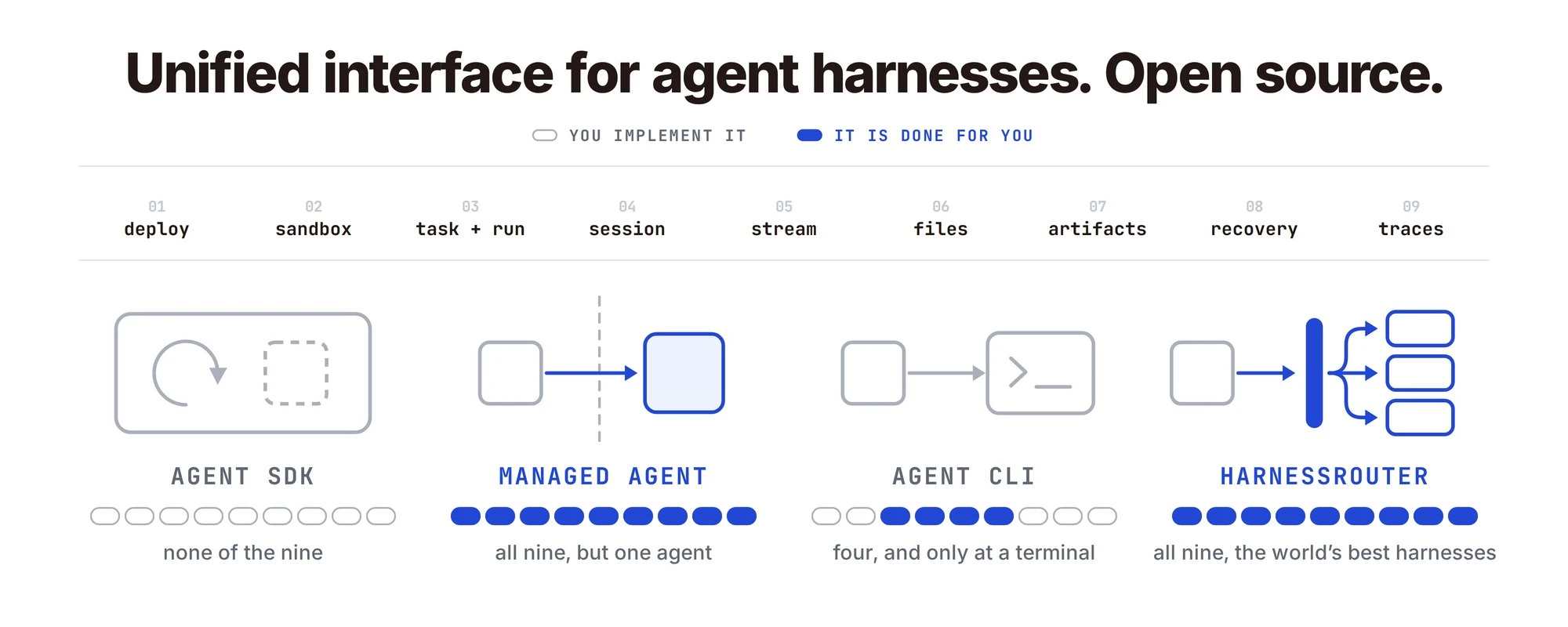
What each approach provides, and what you still own
There are several ways to bring an AI agent into a product: build with an SDK, call a managed service, or integrate an existing agent through its CLI or programmatic interface.
We're building HarnessRouter, an open-source unified interface for bringing agent harnesses into your product through one API.
These approaches overlap. The same agent harness may be available as a CLI, through an SDK, and as a hosted service. The practical difference is how much your team builds, operates, and adapts when your needs change.
Here is what each approach provides, what remains your responsibility, and where HarnessRouter fits.
Agent performance depends on the model and the harness around it. The harness manages how the agent uses tools, maintains context, and works through a task. Those decisions affect quality, cost, and elapsed time, even when the model stays the same.
Bringing that agent into a product introduces another set of responsibilities:
deployment · sandboxing · tasks and runs · sessions · streaming · files · artifacts · recovery · traces
Not every product needs all nine. Different SDKs, harnesses, and services cover different parts of the list. What matters is understanding which parts they provide and which parts your team still owns.
1. Agent SDK
An agent SDK is a set of libraries developers use to build or programmatically control AI agents: software that takes actions to complete a task, rather than only generating text.
An SDK typically helps you:
- Connect to a model that interprets the request and decides what to do next.
- Configure tools for searching documents, querying databases, or calling APIs.
- Run the execution loop: ask the model, execute a tool, return the result, and continue.
- Manage context and expose execution events to your application.
The scope varies. Some SDKs provide composable building blocks. Others expose a complete, established harness. The Claude Agent SDK, for example, provides the tools, agent loop, and context management that power Claude Code. SDKs can also include tracing: the OpenAI Agents SDK has it built in.
You own the production integration
An SDK can do substantial work for you. Your team still has to make it fit your product's operating environment.
If the agent executes code, you need an appropriate execution environment and access controls. If it serves multiple customers, you need to connect sessions, files, and credentials to the right users. If it streams events, those events need to reach your UI.
A session API can preserve conversation history. Your application still needs to decide who can access that history, where it lives, and how long it is retained.
Built-in traces can show the agent's steps. You may still need to connect them to application requests, customer accounts, and infrastructure failures.
Adding another agent within the same SDK may be straightforward. Integrating a different harness can introduce a second set of session formats, tool conventions, events, and lifecycle rules.
An SDK is a strong fit when you need direct control over agent behavior and are comfortable owning that integration.
2. Managed Agent
A managed agent service runs the agent's underlying infrastructure for you.
Instead of operating the runtime yourself, you configure instructions, tools, and access, then call the service from your product through an API.
Depending on the service, the provider handles:
- Hosting, execution, and scaling.
- Sessions and task state.
- Sandboxed environments and runtime permissions.
- Monitoring and execution records.
Your team still defines the application's behavior, connects its data, and decides what each user is allowed to do.
You adopt the provider's runtime contract
A managed service removes operational work. It also makes your product depend on the provider's interfaces and supported behavior.
That does not necessarily mean one model or one agent. A provider may offer several. The dependency is on how that platform represents sessions, registers tools, streams events, stores files, and handles failures.
If another harness becomes a better fit, migration may require adapting those interfaces and moving state. Standard protocols and a well-designed application adapter can reduce the effort, but compatibility still needs to be checked.
A managed service is a strong fit when its capabilities match your workload and you want the provider to operate the infrastructure.
3. Agent CLI
An agent CLI packages an agent for use through the command line.
It commonly arrives with an execution loop, tools for working with files and commands, permission controls, and session behavior. You can give it a task and let it work through the steps.
Many CLIs also support automation. Codex, for example, offers non-interactive execution, structured event output, and session resumption. Some harnesses provide SDKs or server interfaces alongside their CLIs.
Automation is the starting point for a product backend
Running a CLI from a script can be simple. Operating it for many customers introduces additional responsibilities.
Your backend needs to assign requests to execution environments, isolate workspaces and credentials, capture events, persist outputs, and enforce timeouts.
A CLI may already save a transcript or support resuming a session. Your service still needs to associate that session with the correct customer and determine what happens when execution stops unexpectedly.
Resuming a conversation also differs from safely retrying an interrupted operation. If a tool has already changed an external system, retrying the task may repeat that action.
The attraction is clear: you can build on an established harness instead of assembling its behavior yourself. The engineering work is turning that harness into a reliable service for your product.
4. HarnessRouter
HarnessRouter brings Codex, Claude Code, Hermes, Pi, and DeepSeek Harness into your product through one API.
Your agent runs on the harness you choose, using its execution loop, context management, and supported tools to complete tasks. Add your product-specific instructions, skills, and data connections to make those capabilities work for your users.
Their agent capabilities. Your product. One API.
HarnessRouter manages the surrounding execution lifecycle through a shared interface covering:
- Tasks and sessions.
- Streaming events.
- Files and artifacts.
- Cancellation, errors, and supported resume operations.
- Execution traces.
HarnessRouter Cloud also provisions and operates isolated task sandboxes.
Open Source: The Router and the Spec
We've open-sourced both the router and the specification behind it.
The router. Run HarnessRouter Community Edition on your own machine with one docker run command. Bring Codex, Claude Code, Hermes, and DeepSeek Harness behind one API, using your own provider keys and paying providers directly. You operate the infrastructure and control its storage. Model requests go to your configured providers; external tools and MCP connections communicate with the services you enable.
Explore HarnessRouter on GitHub
The spec. UHP (Unified Harness Protocol) is an open standard for connecting products to agent harnesses. HarnessRouter is an implementation of that standard. The specification gives other implementations a shared contract to build against.
Read it, try it against your own workflows, and tell us where it doesn't fit.
Or use HarnessRouter Cloud.
Let us operate the infrastructure. Model usage is billed at exactly what the model's provider charges, with no markup; agent runtime usage is billed separately.
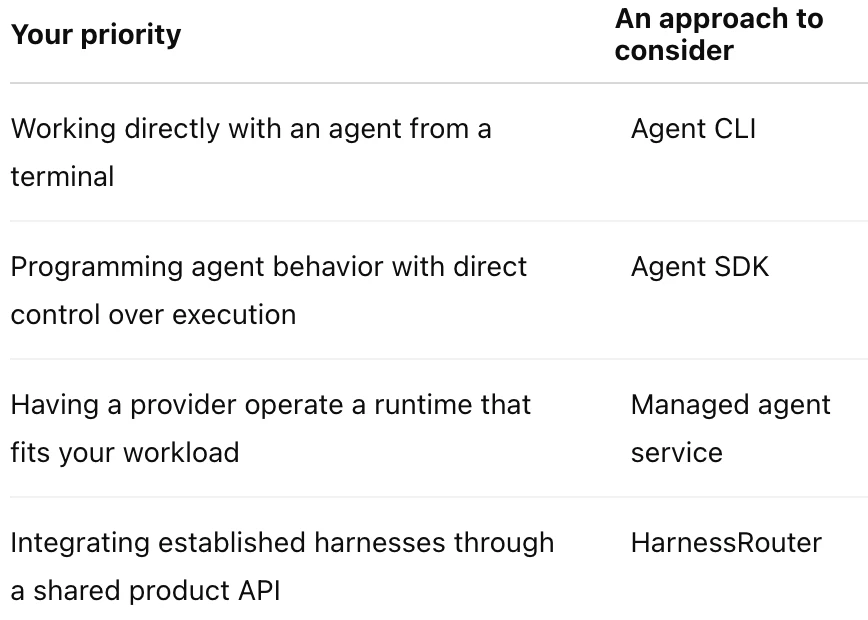
How to Choose
These choices can coexist. You might use a CLI during development, an SDK for a custom workflow, and HarnessRouter for other agent-backed features.
Choose based on the work you want your team to own: agent behavior, production operations, and integration across harnesses.
The common mistake is to choose on a capability demo, ship, and discover six months later that the thing you chose was an architecture.
Bring an agent into your product through one API
Run complete harnesses behind one contract, hosted or self-hosted, and keep the harness a parameter rather than a commitment.
Start building free