
Bringing your own API key (BYOK) means an application calls an AI model provider with a credential that belongs to you or your organization, so the provider account, not the application vendor, records usage, applies quotas and bills the model calls. Sanity's glossary entry on BYOK in AI products describes this arrangement, and Cursor's documentation confirms that its providers bill users directly for requests made with a custom key. This guide covers the mechanics, the cost model, key storage and rotation, the limits of BYOK, and how it applies when an application runs agent harnesses such as Codex or Claude Code.
TL;DR
- BYOK means the model provider bills your own account for inference, and your provider quotas and rate limits apply.
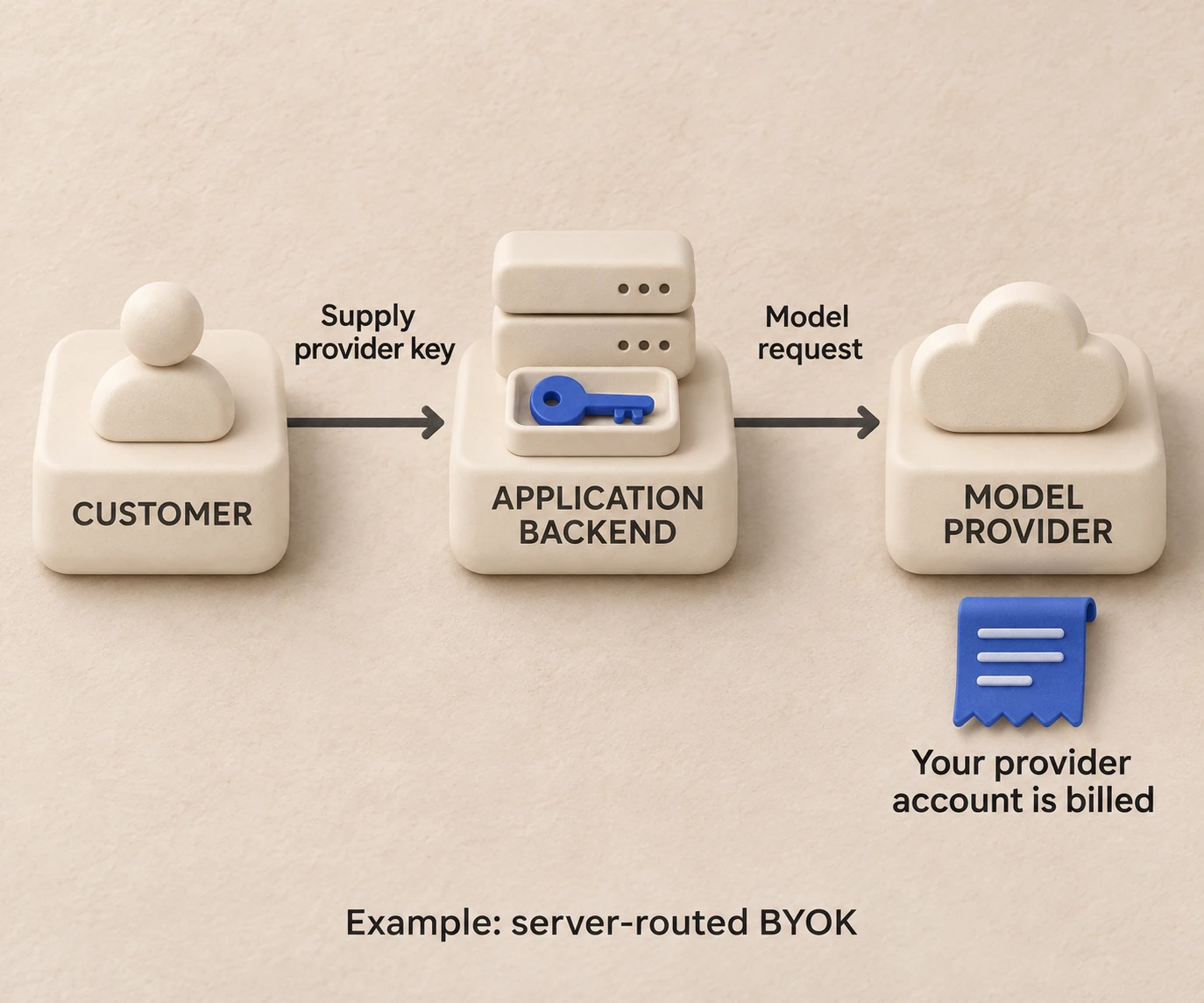
- Your key can still pass through the application's servers: BYOK changes who pays and who controls the credential, not whether the application is in the request path.
- BYOK does not automatically improve privacy, because data handling follows the selected provider's policy.
- Store keys server-side in a secret manager, separate them per environment, and rotate and revoke them on a schedule.
- With HarnessRouter, BYOK routing has no fee up to $25,000 per month of model usage at listed prices; above that volume, the pricing page lists a separate 5% routing fee. Model provider costs have no markup.
What bringing your own API key means
An API key is a secret string issued by a model provider that identifies your account on each request. In a standard hosted product, the vendor holds one bundled account with the provider, absorbs the inference cost and passes it on through subscription or usage pricing. Under BYOK, you create the key in your own provider console and give it to the application. Every call made with that key is attributed to your account, counted against your quotas and invoiced by the provider.
The term has a second, older meaning in cloud security: customer-supplied encryption keys for data at rest, managed in a key management service. In AI products the phrase normally refers to the model-provider credential, a distinction Sanity states explicitly. Teams that need background on how credentials, tokens and endpoints fit together in a larger system can read this overview of API integrations for IT teams before designing key handling.
Does BYOK bypass the application?
Not necessarily. Cursor documents that requests made with a custom key are still routed through its servers for final prompt building, and that the key is sent to its backend with each request over encrypted connections. In that server-routed pattern, the application orchestrates the prompt, tools and session state, and the provider account supplies the model capacity.
This matters for threat modeling. When you hand a key to an application, you are trusting its backend with a credential, so you should know where it is stored, how it is encrypted and whether it ever reaches code that executes untrusted instructions.
How developers connect their own keys
The flow is similar across products. You create a key with the provider, supply it to the application, let the application send model requests with that credential, and then watch usage and invoices in the provider dashboard. Sanity outlines this sequence, and Cursor documents the settings-screen version of it. Beyond a settings screen, applications generally accept a key through one of four channels:
| Channel | Typical use | Main consideration |
|---|---|---|
| Settings or connection screen | End users and small teams | Check whether the application stores the key or forwards it per request |
| Environment variable | Self-hosted services, CI jobs | Scope the variable to one process or environment |
| Command-line option | Local development and scripts | Avoid shell history and logs capturing the value |
| Server-side secrets vault | Production services | Best rotation and audit story |
The provider side is a short procedure. For an introduction to how a typical platform account issues and scopes keys, a third-party overview of OpenAI platform setup describes the usual flow of connecting a provider key and choosing supported models.
Which providers and key types are supported
There is no universal list. Support is specific to each application. Documentation in the field names OpenAI, Anthropic, Google, Azure and AWS Bedrock, along with OpenAI-compatible custom endpoints and local model servers. Applications may accept plain API keys, OAuth or device-code credentials, or a custom base URL. GitHub's documentation on bring your own key for Copilot notes that user-configured BYOK can connect to a compatible cloud service or to a model server on the user's own computer or network, which opens the door to locally hosted and air-gapped models.
Who pays, and what it does to cost and rate limits
With BYOK, your provider account generally pays for inference, and its quotas and rate limits apply to your traffic. Three practical consequences follow.
- Cost attribution is direct. The provider invoice shows exactly what the model calls cost, with no bundled markup inside a vendor subscription.
- Rate limits belong to you. A burst of agent sessions can exhaust your provider tier, and you see the throttling in your own dashboard.
- The application still has costs. Hosting, session storage, observability and routing do not disappear, so applications that support BYOK typically charge a platform or routing fee, or fold it into a subscription. Cursor, for example, applies a per-million-token rate to certain third-party requests on its Teams and Enterprise plans.
Agent workloads make this more visible than chat. An agent harness may run dozens of model calls inside a single task, so provider-side limits and budgets deserve attention before launch. Where supported, configure enforceable provider spending limits at the key, project or account level, and alert on usage anomalies. A budget alert is not necessarily a hard cap; enforce application-side limits as well.
Securing, rotating and revoking provider credentials
A provider key is a bearer credential: anyone holding it may incur charges or access resources within the permissions and quotas granted to that key. The baseline practices are consistent across security guidance:
- Keep keys server-side. Never ship a provider key in a browser bundle, mobile app or public repository.
- Use a secret manager or environment variables injected at deploy time, not values committed to configuration files.
- Separate keys by environment. Development, staging and production each get their own key, with separate budgets and enforceable caps where supported.
- Apply least privilege. Where the provider supports project-scoped or permission-limited keys, use them.
- Rotate on a schedule and on events. Rotate periodically, whenever someone with access leaves, and immediately after any suspected exposure. Then revoke the old key.
- Review audit logs and usage. Unexpected model usage is often the first sign of a leaked key.
Keep credentials out of the sandbox
Agents deserve extra care because they execute code and follow instructions that may come from untrusted content. A credential placed inside the environment where an agent runs can be read by a prompt-injected command. The safer design holds provider credentials in the control plane, which injects them into model requests outside the sandbox, so the agent process never sees the raw secret. For the isolation side of this design, see our write-up on AI agent sandboxing.
Handling users who supply no key
If you build a product where customers can bring their own keys, some will not. Plan for three states: a valid key, an invalid or expired key, and no key.
- Validate at entry. Make a minimal authenticated call when the key is saved, and reject it with a clear message if the provider returns an authentication error.
- Surface provider errors verbatim enough to act on. Distinguish authentication failures, quota exhaustion and provider outages, because each requires a different user action.
- Define a fallback. The HealthLog provider documentation shows one pattern: skip providers that have no credentials, try configured alternatives in order, and use an administrator-managed shared key only as the last entry in the chain. Use a shared key only when the user and operator authorize that fallback, with an explicit budget and compatible data-handling policy; placing it last does not by itself bound spend.
Benefits and boundaries of BYOK
The benefits are direct provider billing, freedom to choose the provider and model, reduced lock-in, and access to local models. GitHub's documentation notes that custom models are added alongside the models it provides, and Cursor lets users pick preferred provider models.
The boundaries are worth designing for rather than discovering later:
- Key management becomes your responsibility, including rotation and revocation.
- Provider quotas and outages become visible in your own traffic, so a fallback model or provider is a good production habit.
- Privacy is not automatically improved. Cursor states that its Zero Data Retention policy does not apply when users bring their own keys, and that data handling follows the chosen provider's policy. Read the retention terms of the provider behind your key.
- Support paths lengthen, since an error may originate in the application or in the provider account.
In short, BYOK is an architectural decision about billing, credentials and observability, not only a settings toggle.
BYOK with agent harnesses
An agent harness is the runtime wrapped around a model: the loop, tools, file access, permissions and session handling. Products such as Codex and Claude Code are harnesses, and the same model can behave very differently depending on the harness around it, as we explain in Agent Harness vs Model. BYOK fits naturally here because the harness and the model account are separable decisions: you can choose a harness for its behavior and bill the model calls to a provider account you already hold.
When an application embeds several harnesses, the key question becomes how credentials map to each one. A unified layer should accept provider keys once, store them server-side, and route each harness's model calls with the right credential, rather than asking your team to wire separate secrets into separate agent backends. The broader picture of where credentials, sessions and runtimes sit is covered in The Backend for AI Agents, and the role of a routing layer in What Is an LLM Router?.
Our perspective
We build HarnessRouter on the view that the model account and the agent runtime should be independent choices. A team should be able to put Codex, Claude Code, Hermes or another supported harness behind one Agent API, and decide separately whose provider account pays for the inference.
That is why we support BYOK alongside managed usage, and why our positioning states that the platform adds no markup on model provider costs. The BYOK routing fee is published openly on the pricing page, so the cost of the routing layer is visible and the model spend stays on your own provider invoice.
We also think credentials belong in the control plane. A provider key is a production secret, and an agent that executes code should not be handed one. Our design goal is that product teams configure keys once, benchmark harnesses and models against their own quality and price targets, and never build a separate secrets pipeline for every agent backend.
Because the core is open source, teams can also self-host the same interface and control key storage in their own infrastructure. Requests to an external model provider still send the necessary authentication and prompt data to that provider.
HarnessRouter Editorial Team
Using BYOK with HarnessRouter
HarnessRouter is the world's first unified interface for agent harnesses. Product teams can plug Codex, Claude Code, Hermes and other supported agent harnesses into their products through one Agent API. It includes agent session management, file handling, plugin support, environment provisioning and benchmarking tools, available as a self-hosted Community Edition or a managed cloud with serverless runtime lifecycle features.
For BYOK, the published pricing lists no routing fee up to $25,000 per month of model usage at listed prices; above that volume it lists a separate 5% routing fee. Top-up credit purchases carry a 5.5% processing fee, with a $0.80 minimum. Plans on the pricing page start with Free at $0 per month, then Developer at $20 per month, Production at $200 per month and Scale at $1,000 per month, with Enterprise available without a published price. Tracing is included with Scale during beta and listed as a $50 monthly add-on for other plans. Short-term agent memory has plan-dependent GB-hour rates, while long-term memory is billed per memory operation with storage included. Agent work is billed per active work minute at published plan-dependent rates; model, user and platform waiting time is not billed. Check the current pricing page for beta rates.

If you are evaluating which harness and model pair fits your quality and cost targets, start on the [HarnessRouter homepage](/) or review the Codex harness and Claude Code harness pages. Teams that want to control key storage in their own infrastructure can start from the Community Edition.
A BYOK checklist for production
- Create one provider key per environment, with separate budgets and enforceable spend caps where supported.
- Store keys in a secret manager and inject them server-side.
- Keep credentials out of any sandbox where agent-generated code executes.
- Validate keys at entry and map provider errors to specific user actions.
- Define an authorized, budgeted fallback for missing keys, with any shared key last.
- Review the data retention terms of each provider behind a key.
- Rotate on a schedule, after personnel changes and after any exposure, and revoke the old key.
- Watch provider dashboards for usage and rate-limit pressure alongside your own tracing.
FAQ
Is bring your own key the same as bring your own encryption key?
No. In AI products, BYOK normally refers to a model-provider API credential that determines who is billed for inference. The older cloud-security meaning refers to customer-managed encryption keys for data at rest. Check which meaning a vendor intends before comparing features.
Does BYOK keep my prompts private from the application?
Not by itself. Some applications, such as Cursor, still route requests through their servers to build the final prompt, and data handling follows the selected provider's policy. Cursor, for example, states that its Zero Data Retention policy does not apply to requests made with a custom key.
Can I use local or self-hosted models with my own key?
Often yes, depending on the application. GitHub documents that user-configured BYOK can connect to a compatible cloud service or to a model server on the user's own computer or network. Support for custom base URLs and OpenAI-compatible endpoints varies by product.
How often should I rotate provider keys?
Rotate on a regular schedule your security policy defines, and also whenever someone with access leaves or a key may have been exposed. Revoke the previous key once the new one is deployed, and use separate keys per environment so a rotation affects only one.