
A managed production path for Hermes Agent is to run it as one harness behind a single API, with sandboxing, sessions and environment provisioning handled for you. HarnessRouter supports Hermes among 30+ agent harnesses and starts on a Free plan at $0 per month. The alternative is to self-host: Hermes is MIT-licensed, so you can install it on a VPS or in a container, and this guide gives both routines, step by step, with the places each one breaks.
Hermes Agent is Nous Research's self-improving agent with a built-in learning loop. With the relevant features enabled, it creates skills from experience, improves them in use and searches its own past conversations. Deploying it for a product, rather than a weekend experiment, means deciding where it runs, which model it calls, how credentials are stored, how it is isolated and how it is kept alive and updated.
TL;DR
- Hermes Agent is free and open source. Your real costs are the model provider and the infrastructure that runs it, plus the engineering time to harden and maintain it.
- Through HarnessRouter you reach Hermes with one API, an isolated sandbox per task and managed agent sessions, and you can switch supported harnesses or models through a consistent contract, while checking capability and session-state compatibility.
- For the Linux VPS route below, use a non-sudo service user, the official installer, a model with at least 64,000 tokens of context and a supervised gateway service. Size the host for your model and tools; the RAM figures below are starting recommendations, not universal minimums.
- Production hardening centers on an isolated execution backend, an explicit user allowlist, credential isolation and updates appropriate to your installation method.
- Get one clean conversation working before you add the gateway, cron jobs, skills or routing.
Choose a deployment path first
Three decisions shape everything else: where the process runs, which model it calls and who operates it afterward.
| Path | Where Hermes runs | Who handles sandboxing, sessions and upgrades | Best fit |
|---|---|---|---|
| HarnessRouter Cloud | Isolated sandbox per task, started through one API | HarnessRouter's runtime and session management | Product teams embedding agents, startups shipping quickly |
| HarnessRouter Community Edition | Your own infrastructure, same unified interface | Your team | Teams that need the open-source, self-hosted edition |
| Direct install | A VPS, bare metal or container you manage | Your team, entirely | Teams operating their own Hermes deployment |
The Hermes Agent harness page lists how Hermes is exposed through the unified interface, and the Hermes API guide covers running it behind your product. The rest of this article follows the full routine, so you can see what each stage involves and what HarnessRouter takes off your list.
What Hermes Agent needs before you start
The official installation guide says the POSIX source installer requires Git, curl, tar and SHA-256 utilities. First-party installs currently run on Python 3.14. On glibc Linux, the managed Node.js needs libatomic.so.1, which minimal Debian, Ubuntu and RHEL images do not ship, so it attempts to install the distro package. A service user without sudo must ask an administrator to install it. Source builds and local browser tools can also need compiler or system-library prerequisites from the official guide.
Beyond the host, you need a model. The quickstart states that Hermes requires a model with at least 64,000 tokens of context and rejects smaller ones at startup. For local models you must set the context to at least 64K yourself.
Hermes also has three setup modes on a fresh install, per the same quickstart:
- Quick Setup: Nous Portal OAuth with no API keys, billed to your Nous subscription.
- Full Setup: you walk through provider and tool options, supplying credentials for the integrations you choose.
- Blank Slate: only the provider and model, with File Operations and Terminal toolsets enabled and everything else off until you opt in.
For a production deployment, Full Setup or Blank Slate fits best, because you decide which credentials and tools exist at all.
Deploy Hermes Agent on a VPS or Linux server
This is the routine documented in OVHcloud's VPS guide, checked against the official installation guide.
1. Size the host and prepare it
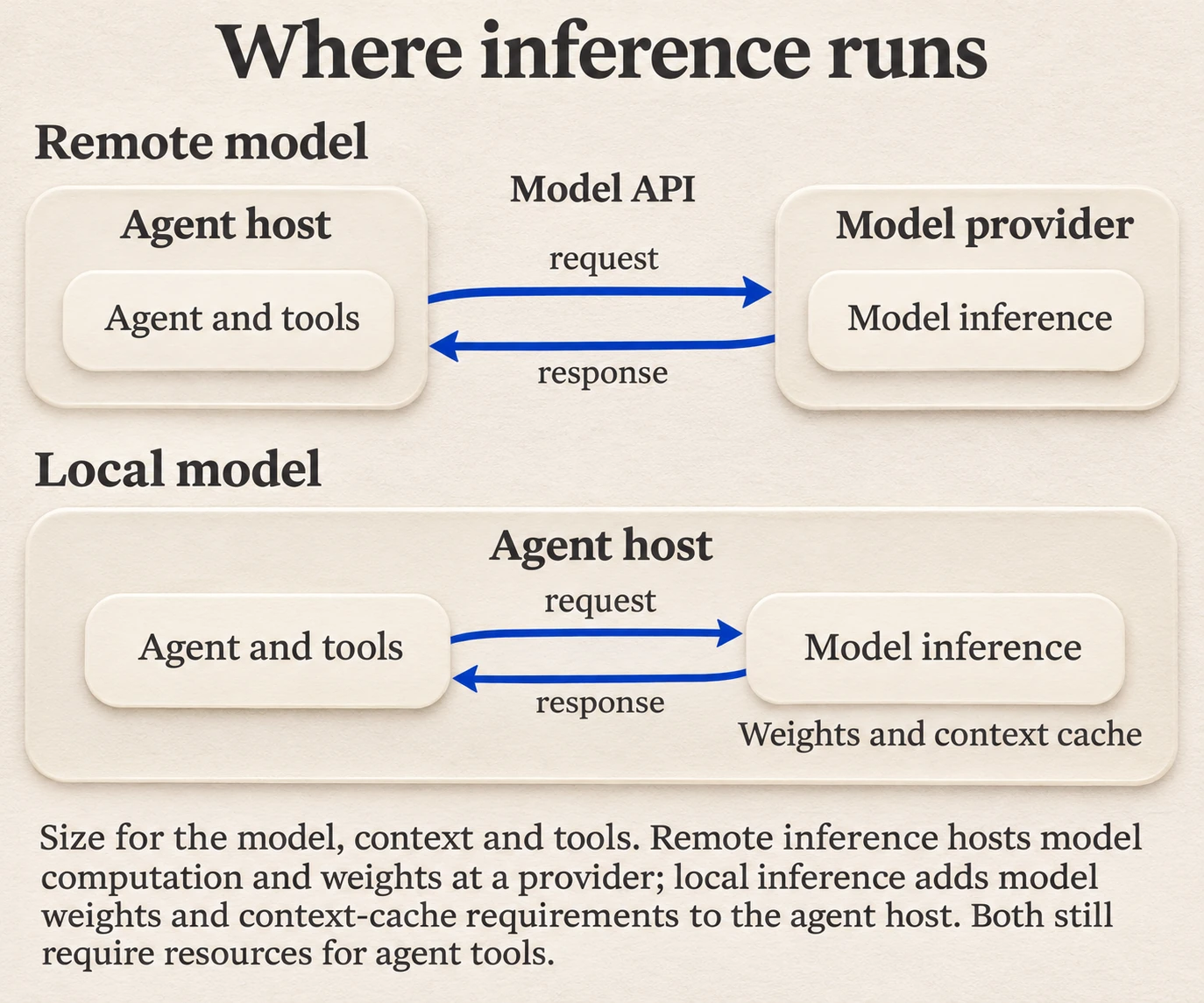
A Linux VPS guide from ServerPoint recommends at least 2 GB RAM when you call cloud model APIs and 8 GB or more for local Ollama models, on Ubuntu 22.04/24.04, AlmaLinux 9, Rocky Linux 9 or Debian 12. Treat those RAM figures as starting recommendations, not guarantees: local model weights, quantization, context cache and enabled tools determine actual capacity. The commands below are for Debian/Ubuntu; other distributions need their own package-manager and account-creation commands. Connect over SSH, then update the system and install the prerequisites:
sudo apt update && sudo apt upgrade -y
sudo apt install -y git curl tar coreutils build-essential libatomic1
Use SSH rather than a browser console. Browser consoles can corrupt characters in long commands.
2. Create a dedicated non-sudo user
sudo adduser --disabled-password --gecos "" hermesThe official guide says to run the installer as the intended service user, so that its home, tool store, config and launcher all belong to that account. This is the first place a hurried deployment goes wrong: installing as root puts an autonomous agent with shell access on the most privileged account on the machine.
3. Run the installer and verify it
Have the administrator open a shell as the new account with sudo -iu hermes. As the hermes user, run the official install.sh script from the documentation, add $HOME/.local/bin to PATH, then run:
hermes doctorhermes doctor checks dependencies and configuration. Resolve blocking errors for the tools you intend to use before moving on.
4. Configure the model provider
Run hermes setup, or hermes model outside a chat session. According to the providers documentation, hermes model is the full wizard for adding providers, running OAuth, entering API keys and configuring endpoints. Inside a session, /model switches between providers that are already configured. Keys for other providers live in ~/.hermes/.env, for example OPENROUTER_API_KEY or DEEPSEEK_API_KEY. A custom OpenAI-compatible endpoint takes a base URL, key, model name and context length.
Let the wizard write the configuration. OVHcloud's guide points out that config syntax changes between versions and that the wizard verifies the endpoint as it goes. If verification fails, check the endpoint URL, model ID, context setting and provider authentication error before changing credentials. Rotate a key only when it is invalid or compromised. An incorrect context setting can cause rejection, truncation or failed requests.
5. Keep it running as a service
First, have the administrator run sudo loginctl enable-linger hermes for the service account. This lets its user-mode systemd manager run without an active login and survive logout. Then, as the hermes user, run:
hermes gateway installOn Linux this installs a user-mode systemd service. If the sudo -iu shell has no user-service bus environment, set export XDG_RUNTIME_DIR=/run/user/$(id -u) as hermes before running the install or systemctl --user commands. Check the service with:
systemctl --user status hermes-gateway
journalctl --user -u hermes-gateway -f
Where this route costs engineering time
Every stage above is a task your team owns indefinitely: host patching, service supervision, credential storage, the sandbox and upgrades. When an agent is a feature inside a product, that work competes with the product itself. HarnessRouter provides environment provisioning, isolated sandboxes and agent session management behind a single API, so you do not operate that underlying host and sandbox layer. Your application still owns user access, business rules and the permissions it grants.
Deploy Hermes Agent in a container
The official Docker guide gives a two-command pattern. First, run the setup wizard once against a host data directory:
docker run -it --rm -v ~/.hermes:/opt/data nousresearch/hermes-agent setupThe wizard writes API keys to ~/.hermes/.env. With Docker installed, the following example runs the gateway persistently and exposes its API only on host loopback. First export API_SERVER_KEY into the invoking shell environment from your secret manager, using a strong random key:
: "${API_SERVER_KEY:?Export a strong API_SERVER_KEY before starting the API}"
docker run -d --name hermes --restart unless-stopped \
  -v "$HOME/.hermes:/opt/data" \
  -p 127.0.0.1:8642:8642 \
  -e API_SERVER_ENABLED=true \
  -e API_SERVER_HOST=0.0.0.0 \
  -e API_SERVER_KEY \
  nousresearch/hermes-agent gateway run
Some details that decide whether this works in production:
- The
/opt/datavolume holds.env,config.yaml,SOUL.md, sessions, memories and skills. Back it up and protect the backup as secret-bearing data, because losing it loses the agent's accumulated state. - Port 8642 is the OpenAI-compatible API and health endpoint when the API server is enabled. The example listens on all container interfaces so Docker forwarding works, but publishes only to
127.0.0.1on the host. For chat-only use, omit the port mapping and API-server environment variables. - Set
HERMES_DASHBOARD=1for the web dashboard and publish port 9119 on host loopback if needed. Use an SSH tunnel or an authenticated TLS proxy for remote access; do not expose the dashboard or agent API directly to the public internet. - s6-overlay supervises the gateway process inside the current official container. Pin a tested image version or digest for production and preserve the data mount when replacing it. Running the whole agent in Docker is different from running its terminal tools in a separate Docker sandbox; verify the execution backend for your chosen deployment.
On NixOS, the official Nix setup page lists it as a Tier 2, best-effort platform. It offers a hardened native systemd mode and a container mode, enabled with container.enable = true.
Connect a model and control cost
Hermes itself is free. What you pay for is the model and the host. Nous Portal is the unified subscription gateway Nous recommends, with one OAuth login covering a catalog of 300+ models, subject to subscription availability; hermes setup --portal configures it. OpenRouter, DeepSeek, Google and supported OpenAI-compatible endpoints can use credentials of your own; verify tool calling and the required context window for the chosen model.
Hermes already supports provider routing and fallback, so a direct install does not require rebuilding those features. HarnessRouter adds a shared execution contract and benchmarking across supported harnesses and models. Configure compatible combinations and require acceptable task success and quality before comparing latency or cost. You can bring your own API keys. According to the pricing page, BYOK routing is free up to $25,000 of monthly model usage at listed prices; above that volume a separate 5% routing fee applies.
Secure the deployment
Hermes runs autonomously with the credentials and system access you give it, so hardening is part of deployment, not an afterthought. The official security page describes eight layers and a Gateway Deployment Checklist:
- Never set
GATEWAY_ALLOW_ALL_USERS=truein production. Hermes denies unrecognized senders by default, so keep an explicit allowlist or use DM pairing codes. - On a native host deployment, set
terminal.backend: dockerto isolate terminal execution, and restrict CPU, memory and disk. For an agent already running inside a container, select a supported execution backend and verify what tools can access, including mounted data. - Keep API keys in
~/.hermes/.envwith strict file permissions. - Audit
command_allowlistand setterminal.cwd. - Run as a non-root user and monitor
~/.hermes/logs/. - Keep the deployment updated using the method for its installation:
hermes updatefor a managed source install, or image replacement for Docker.
For stronger credential isolation, the egress proxy documentation describes iron-proxy, an Apache-2.0 daemon that lets a Docker sandbox hold only opaque proxy tokens instead of real API keys. Setup is hermes egress install, hermes egress setup and hermes egress start. It keeps the mapped upstream credentials outside that Docker terminal sandbox when correctly configured. It does not protect a compromised host or unrelated credential paths, and the boundary depends on keeping the CA private key secret and the proxy endpoint intact.
At the firewall, ServerPoint's guide advises opening only SSH and the gateway ports you need, and using SSH key-only authentication.
Teams that want to build security skills around agent deployment can look into AI agents training programs. For the sandboxing layer specifically, our AI agent sandboxing guide compares building it yourself with getting it bundled. HarnessRouter runs each task in an isolated sandbox by default, so that layer arrives configured.
Verify, maintain and troubleshoot
The official quickstart gives operators a rule: if Hermes cannot complete a normal chat, do not add more features yet. Get one clean conversation working, then layer on the gateway, cron, skills, voice or routing, and verify session resume with hermes --continue before moving on.
Then use BinaryLane's support documentation as a maintenance reference:
| Symptom | Likely cause | Fix |
|---|---|---|
ripgrep or ffmpeg missing after setup | Managed-tool preparation or a distro-package failure | Run hermes doctor and follow the reported repair instructions; refresh apt indexes only for distro-installed packages |
| Gateway will not start | Service or configuration error | Read journalctl --user -u hermes-gateway, then run hermes doctor |
| Model rejected at startup | Context under 64,000 tokens | Choose a larger-context model |
| Authentication errors | Invalid or expired API key | Check with hermes doctor, rerun hermes setup |
| Messages ignored | Sender not on the allowlist | Add the sender or use DM pairing |
Routine service commands are hermes gateway status and hermes gateway restart. For a managed source install, hermes update follows the selected release channel, prepares dependencies and handles configuration and restarts; check available changes first with hermes update --check. For Docker, pull the tested image version and recreate the container with the same data mount. Nix deployments use their flake/profile update and rebuild workflow. Back up state and verify the deployment after an update.
From deployed agent to product feature
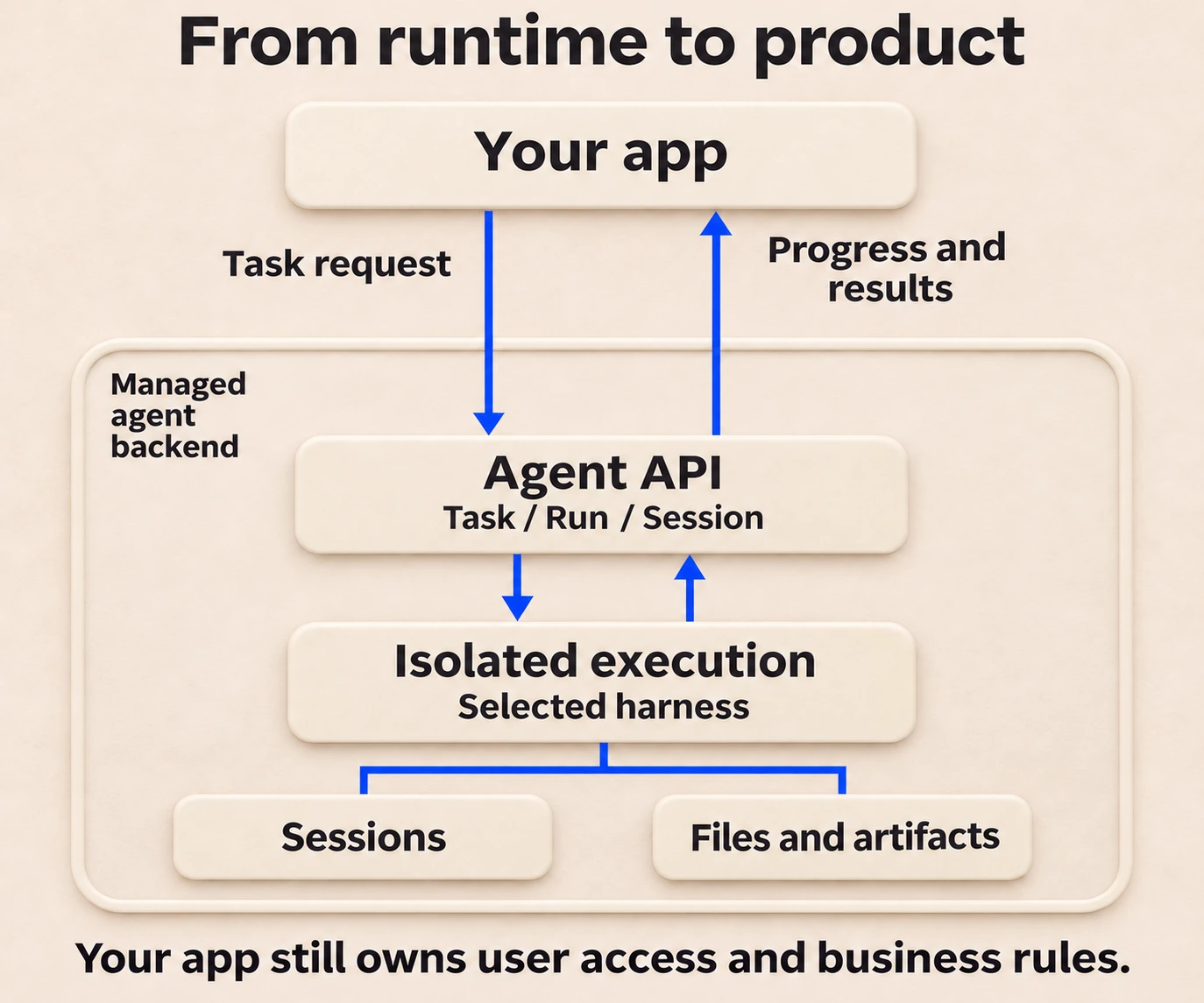
Hermes has a native API server, but running it is only part of operating an agent-backed product. Your product also needs user access controls, state and file policies, and a managed execution lifecycle. HarnessRouter is the world's first unified interface for agent harnesses. It combines one Agent API, serverless execution in isolated sandboxes, and tracing to understand runs and optimize the Harness × Model configuration for each task. Its Task, Run and Session contract covers streams, files and artifacts across 30+ supported harnesses, including Hermes. The shared contract does not make every harness capability or session state identical. The Hermes Agent integration guide walks through setup, tools and the one API, and deploying AI agents from prototype to production covers the broader lifecycle. A side-by-side of running Hermes directly or through HarnessRouter is available for teams weighing the two.
This reduces dependence on proprietary application interfaces. HarnessRouter is built on the open Unified Harness Protocol (UHP), so supported choices can share a calling contract; capability differences, credentials, permissions and state migration still need to be handled. The UHP and MCP comparison explains how the protocol sits next to the Model Context Protocol in the agent stack.
Our view: the harness layer should be infrastructure
A team may start by installing a single harness on a server. That works until the product needs a second harness, a cheaper model for simple tasks, or an isolated sandbox per customer request. At that point each harness has its own session format, credential handling and runtime, and the integration code becomes the bottleneck.
We built HarnessRouter on the premise that the harness layer should be open, interchangeable infrastructure. Our Unified Harness Protocol provides a shared contract for supported harnesses. Harnesses, models, providers, skills, tools, plugins, memory and sandboxes form configurable building blocks; teams evaluate compatible combinations for their tasks, with success and quality as constraints on latency and cost. Hermes Agent is one of those blocks, and a strong one.
Self-hosting stays an honest option for developers, which is why we publish the open-source Community Edition. For teams shipping agent-powered products, we think the leverage is in the unified interface, not in re-solving provisioning, isolation and session management for every harness.
HarnessRouter Editorial Team
Start with Hermes on HarnessRouter
HarnessRouter Cloud has a Free plan at $0 per month, a Developer plan at $20 per month, a Production plan at $200 per month and a Scale plan at $1,000 per month, with Enterprise available on request. Tracing is included with Scale during beta and offered on other plans as a $50-per-month add-on. Top-up credit carries a 5.5% processing fee with a $0.80 minimum. Agent short-term memory, in beta, has a list rate of $0.0000840 per GB-hour, with plan-specific rates. Plan prices are separate from applicable model and runtime usage charges. All of it is listed on the pricing page. Teams that prefer to run the stack on their own hardware can use the open-source Community Edition.

If your goal is a Hermes-powered feature in production, start on the Free plan, call Hermes through the one API and move up when usage demands it.
FAQ
Is Hermes Agent free to deploy?
Hermes Agent is MIT-licensed and free to self-host. Your costs come from the model provider and the server or cloud runtime. HarnessRouter's Free plan has a $0 monthly plan fee; usage can still incur model and runtime charges. You can bring your own model keys, with no BYOK routing fee up to $25,000 of monthly model usage at listed prices and a separate 5% routing fee above that volume.
How much RAM and which model does Hermes need?
ServerPoint recommends at least 2 GB RAM when you use cloud model APIs, and 8 GB or more as a starting point for local Ollama models. Actual local requirements depend on model weights, quantization, context cache and tools. The official quickstart states that the model needs at least 64,000 tokens of context, or Hermes rejects it at startup.
Can I run Hermes Agent in Docker?
Yes. The official image nousresearch/hermes-agent runs the setup wizard once and the gateway persistently, with a volume at /opt/data for configuration, sessions, memories and skills. Port 8642 serves the API when it is enabled and configured for the container network; port 9119 serves the dashboard when HERMES_DASHBOARD=1 is set. Publish only on host loopback unless you have a controlled, authenticated remote-access path.
How do I keep a deployed Hermes Agent secure?
Run it as a non-root user, use a supported isolated execution backend, keep an explicit user allowlist and store keys in ~/.hermes/.env with strict permissions. A correctly configured egress proxy keeps mapped upstream credentials out of the Docker terminal sandbox. Keep API and dashboard access controlled, and update source, Docker and Nix installs through their respective update methods.
Can I use Hermes alongside other harnesses?
Yes. HarnessRouter supports 30+ harnesses through one API, so Hermes can sit next to harnesses such as Codex or Claude Code. For a head-to-head view, see the Hermes Agent and Pi comparison.
Sources
- NousResearch/hermes-agent on GitHub
- Install Hermes Agent: Official Guide
- Hermes Agent Quickstart
- How to install Hermes Agent on a VPS, OVHcloud
- Install Hermes Agent on a Linux VPS, ServerPoint
- Hermes Docker Setup
- Nix and NixOS Setup
- Hermes Agent providers documentation
- Hermes Agent Security
- Egress credential-injection proxy (iron-proxy)
- Installing Hermes Agent on BinaryLane